Tag: assignments

Winter 2026 Hack/Doc Fest at Connecticut

CLAMP held its Winter 2026 Hack/Doc Fest at Connecticut College in New London, Connecticut. This was CLAMP’s second visit to Conn College, after the Winter 2024 Hack/Doc Fest. The primary focus this time around was the new Moodle 5.1 release, plus follow-up on the issues with the question bank in Moodle 5.0. In addition to this overview, please see our separate posts on data privacy and the safe exam browser.

Issues specific to Moodle 5.1

Question bank

The changes to the question bank in Moodle 5.0 required their own separate blog post to hash out. On the whole, folks felt better about the question bank in Moodle 5.1. That said, there are still some issues to be aware of.

Sharing question banks from the course level

We evaluated how to share question banks (QB) between courses now that there are no category-level question banks. In this example, we have Course 1 and Course 2 taught by Teacher 1 and Teacher 2. Teacher 1 can create a course-level QB in Course 1. Then they join Course 2 as a Teacher and import a quiz from Course 1. This quiz has 3 questions from the Course 1 course-level QB. Teacher 2 cannot edit those questions. Course 2 also does not have full access to the course-level QB in course 1.

If Teacher 1 edits a question in this quiz from their one in Course 1, it is also changed in the instance in Course 2. In the case that the quiz has been attempted, the Teacher 1 can change the the question. The student who had attempted the quiz still sees the original question, but future students will get the new version of the question unless the faculty explicitly chooses the question version in the Quiz settings.

If Teacher 2 duplicates the quiz, then they get a copy of the quiz but the questions are copied into a new “System shared question bank” in Course 2. Teacher 2 can edit that copy of those questions. But it is strange that they are dumped into a “System shared question bank” rather than in a quiz-specific question bank.

Restoring quizzes from Moodle 4.5 to Moodle 5.1

There are still some challenges with importing quizzes from Moodle 4.5 to Moodle 5.1. We tested with quizzes from a school’s production 4.5 instance. The first issue is that we saw a number of non-fatal errors that nevertheless had the red background that usually indicates a more serious issue:
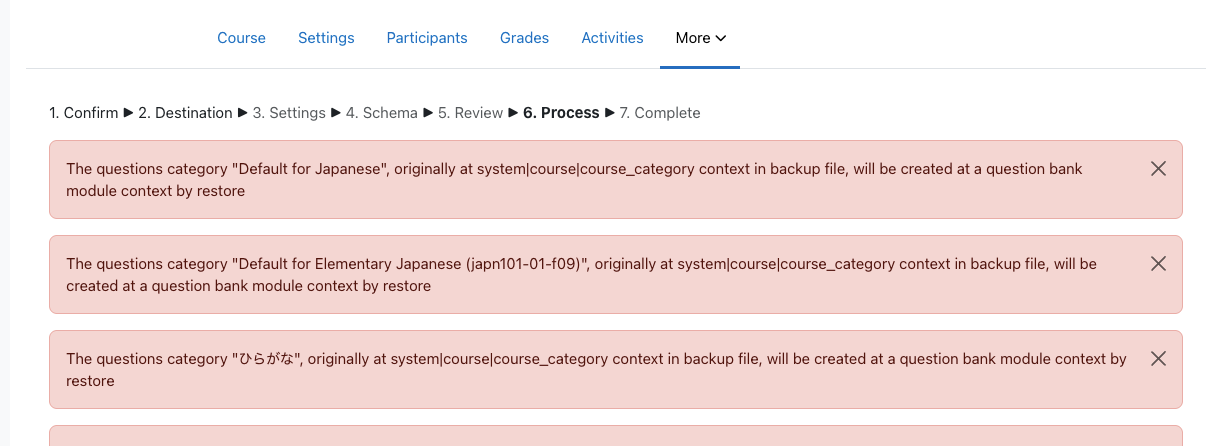
Moodle displaying a series of non-fatal errors when importing questions
Category-level questions will be stored course-level question banks

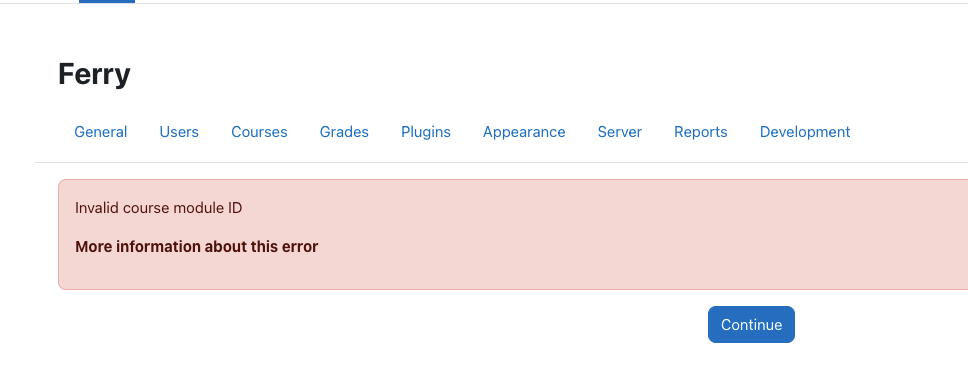
These are all questions that were heretofore stored at the category level. Some of these questions contained Random questions from specific categories. The questions appear to load, but clicking on the “See questions” link on the Random Questions causes a fatal error:
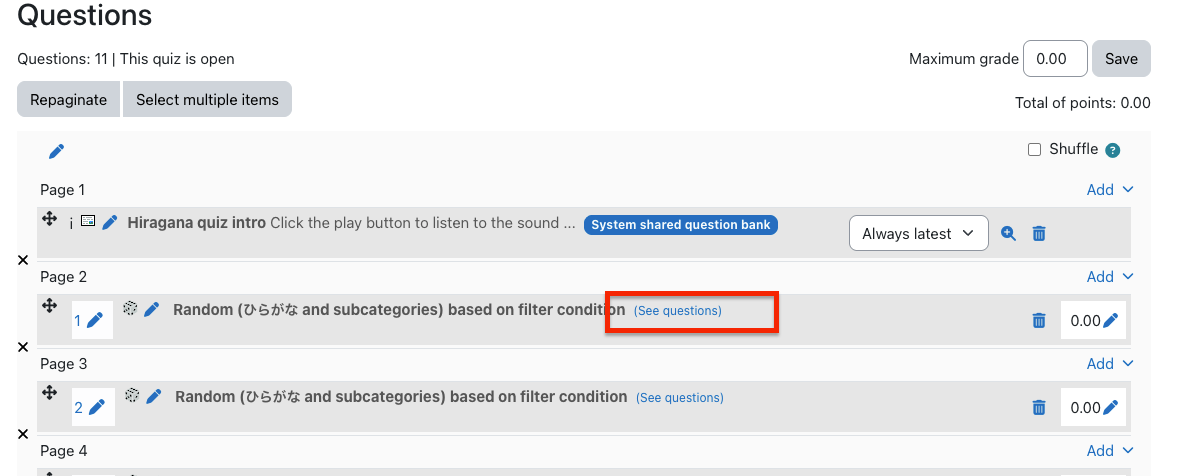
Moodle question bank with list of questions

Moodle fatal error about invalid course module ID

As of yet, we cannot view the list of questions in the categories for these quizzes. The course-level question bank shows the list of quizzes, but clicking on them takes you to the quiz itself, and does not show you the list of questions in the category from which these Random questions are pulled.

Regular multiple-choice questions are labeled with “System shared question bank.” However, if I go to the course-level question banks, even though I see a System shared question bank (created from previous testing), the imported multiple-choice questions are not there. Site home does not have any question banks.

Conclusion: the questions are clearly there. But they are “hidden” in some kind of secret question bank. Use extreme caution when importing quizzes from previous versions into Moodle 5.1.

Activity overview

Activity overview is another feature that saw changes in Moodle 5.0 and was further improved in 5.1. It’s been extended to include dates and completion information for BigBlueButton, Choice, Database, Forum, Glossary, H5P, Lesson, SCORM and Quiz in addition to Assignment, Feedback, Resources, and Workshop.

Admin search improvements

Moodle carried out research into the information architecture (IA) of the site administration interface. Among other outcomes, this research identified a need to improve search within the administrative interface. The first improvement to land is MDL-85518, returning search results in a more intuitive order.

Server configuration

For self-hosted schools, Moodle has made a major change in its code layout for the 5.1 version. This is done to permit the introduction of the “router” feature and prettier URLs. Most of the public code that was previously in the root of the code base is now in a public subdirectory. Your config.php still lives in the root. Also still in the root is admin/cli/ with various tools, including cron.php. You’ll need to make various one-time adjustments to your deployment to accommodate these changes. Included below is the Apache configuration for CLAMP’s Moodle 5.1 test environment:

<VirtualHost *:443>
    ServerAdmin admin@clamp-it.org
    ServerName ferry.clamp-it.org
    DocumentRoot /var/www/ferry/site/public

    ErrorLog ${APACHE_LOG_DIR}/ferry-error.log
    CustomLog ${APACHE_LOG_DIR}/ferry-access.log combined

    <Directory "/var/www/ferry/site/public">
        AllowOverride None
        Require all granted
        DirectoryIndex index.php
        FallbackResource /r.php
        <FilesMatch \.php$>
            SetHandler "proxy:unix:/run/php/php8.3-fpm-ferry.sock|fcgi://ferry/"
        </FilesMatch>
    </Directory>

    <Proxy "fcgi://ferry/">
    </Proxy>

    SSLCertificateFile /etc/letsencrypt/live/ferry.clamp-it.org/fullchain.pem
    SSLCertificateKeyFile /etc/letsencrypt/live/ferry.clamp-it.org/privkey.pem
    Include /etc/letsencrypt/options-ssl-apache.conf
</VirtualHost>

Section limit deprecation

Moodle has deprecated the maxsections configuration setting; going forward there will be no limit to the number of sections a teacher can add to a course. Out of curiosity, we used Moodle WebService Manage Sections plugin to bulk add 500 sections to a course (ironically, that plugin hasn’t be updated to reflect the change to maxsections). The course and navigation were functional afterwards.

Manual enrollment notifications

Manual enrollment notifications are sent immediately regardless of whether the enrollment is active. This has to do with how enrollment status is tracked in the database. There are only two states: enrolled or suspended. The start and end times are tracked separately. Moodle calculates whether an enrollment is active based on the time constraints, but it doesn’t go back to the database. It would be onerous for cron to check every minute whether an enrollment has become active.

That does leave the question of the message to the user. The default message for a new manual enrollment, as defined in the language string enrol/customwelcomemessageplaceholder, is this:

Hi {$a->firstname}, you are enrolled in the course {$a->coursename}.

Moodle allows teachers to override this on a per-course, per-enrollment method basis. It’s buried in the course navigation, in Course > Participants > Enrolment methods > Self enrolment (or Manual enrolment), if you edit the method. Moodle provides numerous placeholders for programmatic customization:
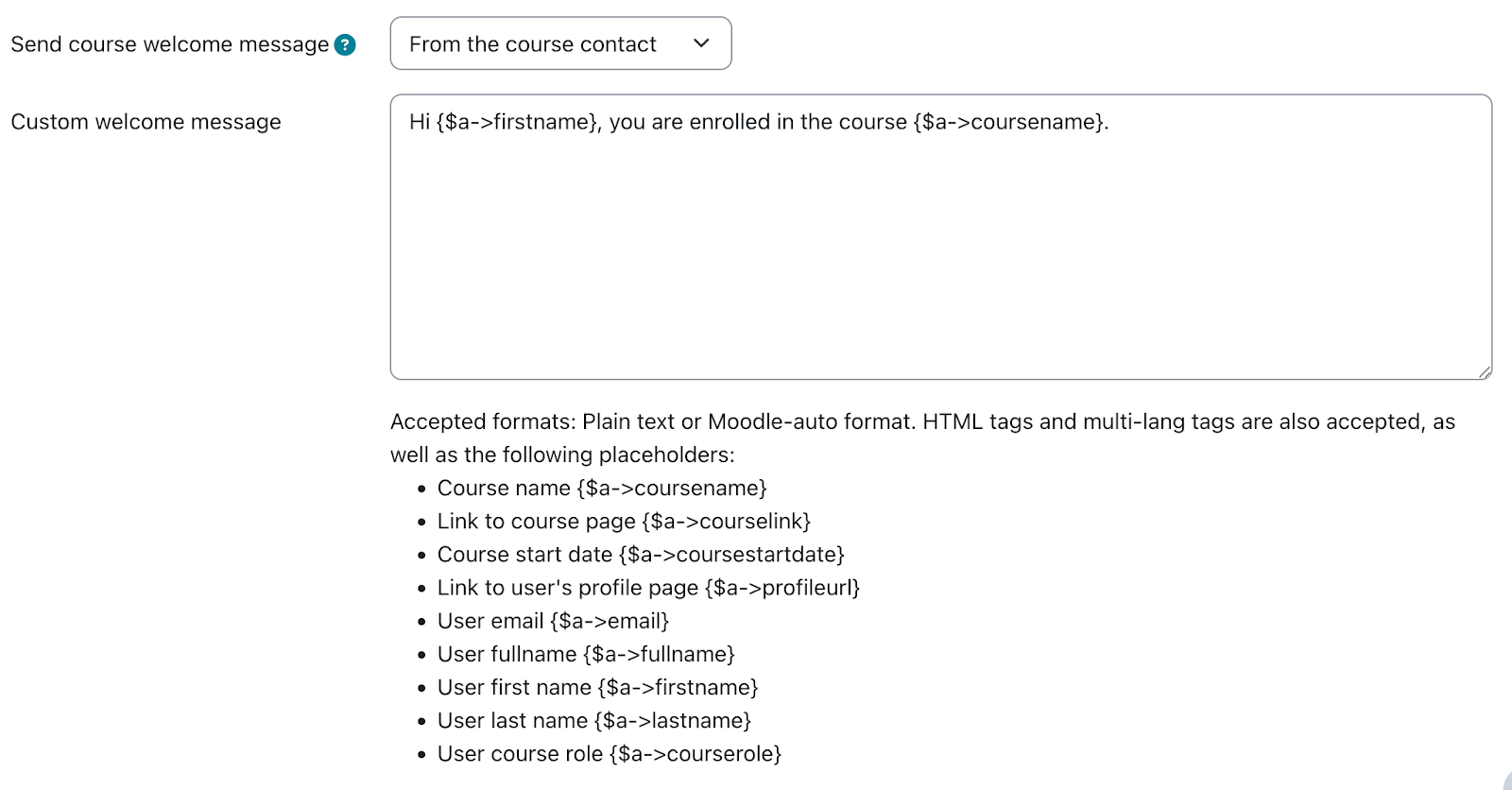
Moodle string customization interface with different placeholders

One thing that’s missing here is the enrollment start date, as opposed to the course start date. Moodle 5.1 added the ability to set an arbitrary state date for a manual enrollment. We’ve proposed a change (MDL-87665) to make that value available to the message customization.

Activity chooser

The activity chooser has a new look and feel. You can still “star” activities, which are now grouped functionally: Assessment, Collaboration, Communication, Resource, and Interactive content. These categories are fixed and can’t be modified. New activities are added to “All.”

Other issues

Phantom grading changes in the gradebook

There is a bug in Moodle that can lead to unexpected changes in the gradebook. When using Google Chrome, with grader editing turned on, if a user uses two-finger scroll or mouse wheel scroll they can change grades unintentionally if the cursor was hovering over a grade cell. On CLAMP’s development environment we could only reproduce this if the user’s browser had the Lastpass extension enabled. Macalester can reproduce the issue in production without the extension.

Core is tracking the issue in MDL-86837. A workaround is to add the following Javascript snippet to Site administration > Appearance > Additional HTML section > Before BODY is closed:

<script>
document.addEventListener("wheel", function(event) {
if (document.activeElement.type === "number") {
document.activeElement.blur();
}
});
</script>

Ongoing issues with group overrides on assignments

We documented some issues with group overrides in assignments at the Summer 2025 Hack/Doc Fest (“Overrides don’t appear properly at times“). There’s another issue, MDL-81004, related to how overrides appear on the timeline in the dashboard.

Here’s an example of the issue in question. Create an assignment with a default due date of midnight, 7 days from today. Create a Group Override and change the due date to be one month later. (Don’t do this testing in February because the shorter month might make it weird). This means the overridden due date is more than 30 days into the future.

Now, log in as a student in the date override group and navigate to the dashboard (in default config) so that the Timeline and Calendar are visible. Given that the calendar is showing the current month and the timeline is set to next 7 days; on the Timeline and calendar the original due date is shown, not the overridden date.

As the student, change the timeline to next 30 days, and the wrong due date (not applying the override) will still appear on the timeline. Still as the student, change the calendar to next month and timeline to next 60 days. Calendar and timeline will now show the override.

Quiz pre-creation

Moodle added a feature in 5.0 to “pre-create” quiz attempts prior to the quiz becoming available. This can potentially reduce performance issues with large quizzes. This must be enabled in Site administration > Plugins > Quiz > General settings. A range of 1-24 hours may be selected for when attempts are pre-created. These settings are sitewide and cannot be changed by teachers. Once the attempts are created the student receives a notification and the quiz cannot be modified.

Data privacy

Please see Using the Moodle data privacy feature for data export for a discussion of using the data privacy features for student data export.

Safe exam browser

Please see Safe Exam Browser integration within Moodle for a discussion of the current state of the Safe Exam Browser integration in Moodle.

Sanitizing courses of student data

We tested the possibility of retaining a course for historical reasons but removing the student data after a period of time because of FERPA concerns over data retention. Moodle has a course reset function available in the interface. The moosh cli package includes a course-reset command which permits automating this functionality. The course-reset command may be combined with the course-list command to output all courses from a category and then reset them:

moosh course-list -c 3 -i | xargs -n1 moosh course-reset

Note that course-list will traverse the subcategories of a category and retrieve all courses. Resetting a course purges course data but retains enrollments.

Error when adding media to the front page

Dragging and dropping an image to the course home page triggers an error and fails. This worked in Moodle 5.0. We reported this as MDL-87661; core has already identified the root cause and proposed a fix.

New plugins from CLAMP schools

LTI Tools API

Reed has developed a new plugin that provides a suite of web services for working with LTI tools on a Moodle installation.

Quick Search Plugin

Swarthmore has developed a new plugin that adds an admin menu search to every page. It can be invoked by pressing Ctrl + Shift + P.
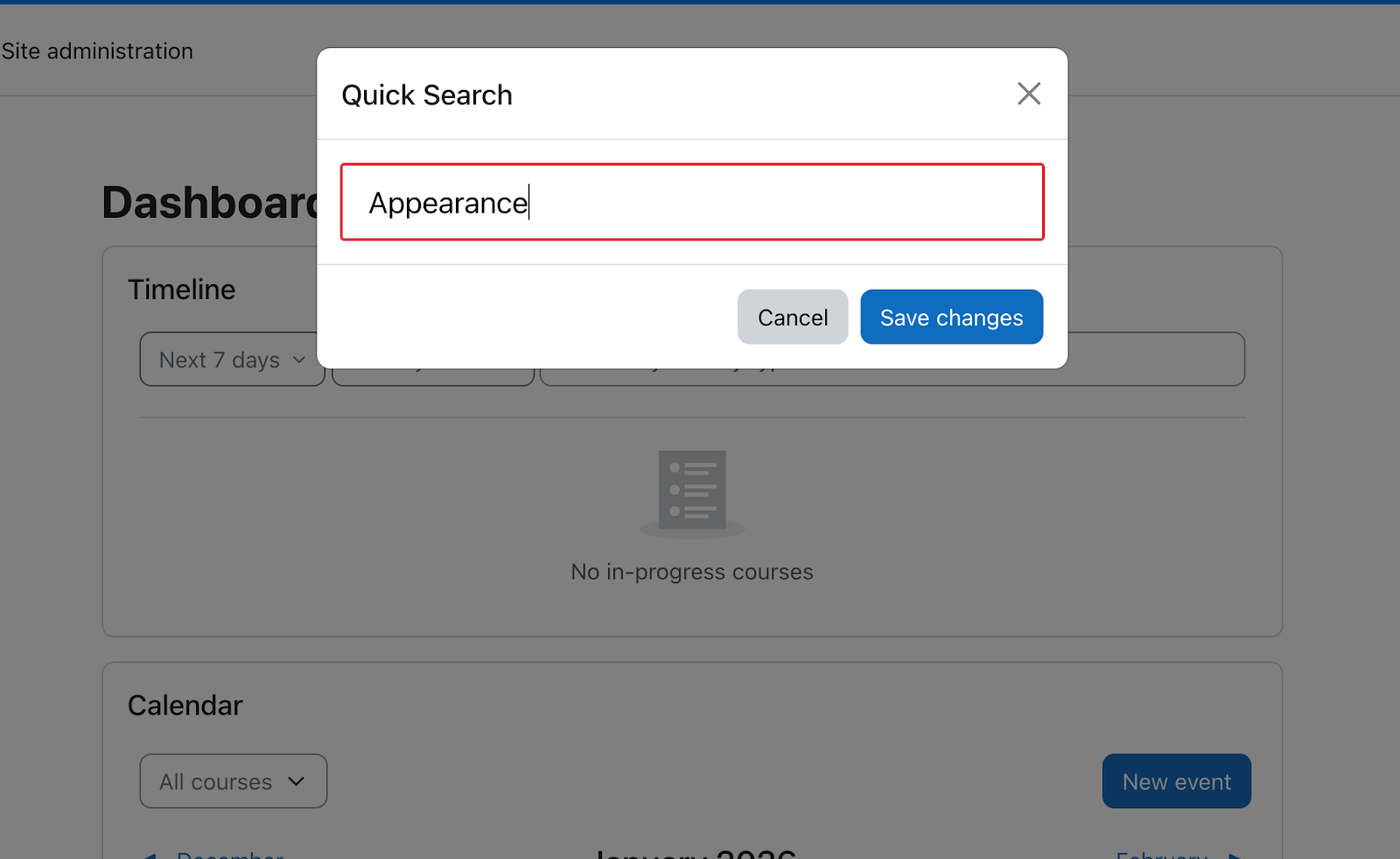
Search box with submit button

Winter 2025 Hack/Doc Fest at Lafayette

CLAMP held its Winter 2025 Hack/Doc Fest at Lafayette College in Easton, Pennsylvania. The primary focus of the event was evaluating Moodle 4.5. We’re happy to report that we encountered no major issues and no blockers to upgrading to Moodle 4.5 this year, although you should take careful note of the new image redaction functionality. Please read on below for for details of the various issues we discussed.

Issues

Subsections

Sub-sections (mod_subsection) are a new feature in Moodle 4.5. This is a great way to organize materials within a topic block. In the past, you needed to use labels and indented items to group items within a section. With this feature, you can create a subsection that is collapsible within the section. We found it difficult to drag-and-drop items from a local folder directly into the subsection, but it is easy to move items into the subsection once they have been added to the topic block itself. You can click on “Add an activity or resource” within the subsection to add content directly to the subsection. You can have multiple subsections within the topic block, but you can’t nest another subsection within an existing subsection.

Scrolling across pages when annotating Assignments

Assignment annotation allows only for clicking through multiple pages. This is cumbersome when trying to flip across multiple pages when annotating. A proposal to allow scrolling instead made some headway in 2020 before the author abandoned it. CLAMP has updated and resubmitted the fix and will work with Moodle HQ to get this feature added.

Image redaction

There is a separate blog post discussing the new image redaction feature in Moodle 4.5. The short version: if you enable it, make sure that you also install exiftool and configure Moodle to use it.

Assignment submission default order

The first time you view submissions in an assignment, they’re sorted by the internal Moodle userid of the submitter. It appears non-deterministic and can confuse faculty. Once you’ve sorted by something else (last name, submission date) that choice persists through logout, but the initial presentation is confusing. CLAMP has submitted a feature request and patch to change this behavior to last name of the submitter.

New notifications

Moodle 4.5 adds new options to notify students of upcoming assignments and quizzes. By default, each user decides what notifications they want. Administrators can change this default. New notification options include the following:

  • Assignment due in 7 days
  • Upcoming assignment due (48 hours before the due date)
  • The assignment is overdue.
  • Quiz opens soon

There is no way for an individual instructor to configure these options or to force a push.

Optional questions for Quiz

Carleton was interested in a Quiz-like activity where students have the option to answer specific questions within a category. They would only be graded for the questions they answered. This is an example point system:

  • 15 multiple choice questions worth 2 points each
  • 5 essay questions about terms (only 3 are required)
  • 5 more essay questions (only 4 are required)

We looked at ways of accomplishing this:

  • A teacher can add a multiplier to the Quiz activity only if all questions are worth the same number of points
  • Changing the Maximum grade to be below the total number of points will only cause the question points to be recalculated in the Results page
    • It still counts all the optional questions
    • Unlimited Grading does not fix this issue
  • Workaround: Create Quiz questions listing all potential question prompts a student can answer.
    • Example: three essay questions with all five essay prompts.
    • Students have to write out what question they are answering

Other avenues to explore:

  • Try lesson activity
  • Maybe branching (conditional formatting)
    • Branching depends on whether want to give students the option to answer all questions for extra credit.
    • Branching is available within a Questionnaire, but not within a Quiz. However, the Questionnaire does not appear to have any auto-grading features (beyond assigning a grade for completion).

Exploring Competencies in Moodle

We took another look at Competencies, a perennial topic at these events. Coming out of Butler in 2016 we called them “a complicated new system with an inherent workflow that isn’t well documented.” Occidental published some documentation about them at Smith in 2019. We took another look at them as an offshoot from the optional Quiz questions work. Findingss:

  • Administrators can build a site-wide template: Site administration > General: Competencies > Competency frameworks
  • Taxonomies are just labels for nesting: 4 level options.
  • Teachers cannot create competencies; they can only pull competencies out of existing frameworks.
  • Teachers can assign competencies to specific activities and resources or just add the competencies to their course in general.
  • This could be useful for programs with a graduation requirement. An example is Carleton’s Writing Portfolio where students upload 3–5 pieces of writing from different courses plus a reflective essay.

We helped unearth two bugs while looking at Competencies this time around: MDL-84147 and MDL-84148.

UX changes to the assignment submissions page

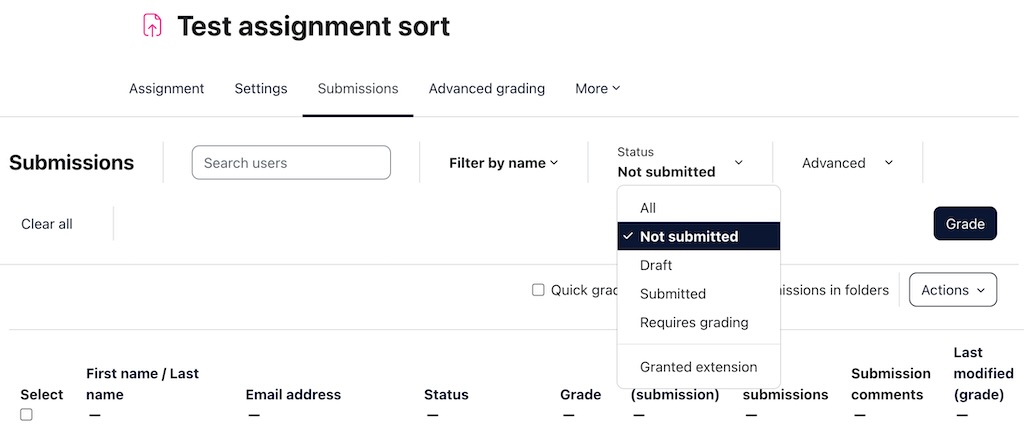
The assignment submissions page has new menus, filters, and headers (See https://moodledev.io/general/releases/4.5#assignment-improvements—phase-1 for a full list). More changes are planned. We liked the new assignment options. All the selection options moved to the top. You can filter by submission status (i.e. submitted, not submitted, draft).

Moodle assignment interface with filters active

AI subsystem

There is a separate blog post discussing the new AI subsystem in Moodle 4.5. OpenAI and AzureAI are supported; we were able to evaluate OpenAI.

Open Badges 3.0

Moodle is working toward supporting Open Badges 3.0. This work will be spread across multiple releases. Two improvements landed in Moodle 4.5:

  • MDL-43938: The uniqueness requirement for badge names has been removed.
  • MDL-82057: Badges can be imported from one course to another using Course Reuse> Import. The imported badge has all the metadata of the first badge, but none of the issuing criteria. It’s also not active. The image is properly deduplicated.

Report Builder

We evaluated numerous improvements to Moodle’s Report Builder, all of which worked as advertised. The biggest is the ability to delete multiple cohorts at once:

  • MDL-52046: this is the option for deleting multiple cohorts at one time.
  • MDL-81330: can now filter based on the cohort within the class participants window.
  • MDL-80123: admin preset reports now work correctly (previously, there was a bug around deleting presets).
  • MDL-82331: time filtering can now go down to the minute (previously could only go down to the hour). It passes.
  • MDL-82529: adding the option to filter cohorts by custom fields.
  • MDL-81399: The relational database now has fields for users’ time zones and languages. As a result, it’s possible to use these to filter custom reports.
  • MDL-82114: Can now filter by the plugin when creating a custom report from the “Files” source.
  • MDL-82512: Can now filter by the plugin when creating a custom report from the “Author” source.

Audio-video recording in TinyMCE

Tiny MCE offers built-in features for recording audio and video. These updates expand the offerings so users can create screen recordings and recordings can be paused and resumed.

  • MDL-81212: Tiny/RecordRTC: Add Screen-recorder button.
  • MDL-81111: Tiny/RecordRTC: TinyMCE conversion – add a “Pause” button for recording A/V.

Completion tracking

Restoring old courses brings up a weird assortment of completion tracking settings. Sharon Strauss from Haverford created this short video about completion tracking to show people what these settings are and how they can quickly change the settings:

What’s next?

Save the date! The Summer 2025 Hack/Doc Fest will be at Swarthmore College in Swarthmore, Pennsylvania, from June 10-12.

Hack/Doc at Carleton: Day 1

A harbinger of things to come

On their first morning in Northfield, Minnesota, the out-of-town attendees passed an uncomfortable silence. Each was separately aware of a singular phenomenon that had resisted all explanations. Finally, having traveled from the Fairfield Inn to Carleton’s campus, someone had the courage to ask if the others, too, smelled french toast with maple syrup.

Thus began CLAMP’s first in-person Hack/Doc Fest since Winter 2020 at Swarthmore College. The mundane explanation of this sensory experience was the presence within the town of a Malt-o-Meal factory. It is apparently quite normal for Northfield’s air to reflect whatever’s being made that day, though chocolate is more common than french toast. An extreme, if benign, example of a small town taking on the characteristics of the local employer.

Pronouns

Cereal questions resolved, CLAMP spent much of the first day at Hack/Doc tackling the display of pronouns in Moodle (see the Summer 2021 write-up for discussion of pronouns in Moodle 3.11). First, CLAMP submitted fixes for the Moodle 3.11 and Moodle 4.0 versions of the Attendance module so that pronouns would display correctly. This was an issue discussed on the CME and first reported to the maintainers by CLAMP members. Second, CLAMP tested viewing a student’s pronouns in the Participants list and discovered that this worked for teachers but not students and that giving students the necessary capability could inadvertently expose restricted user profile fields. CLAMP reported this to the Moodle tracker (MDL-75086).

Timed assignments

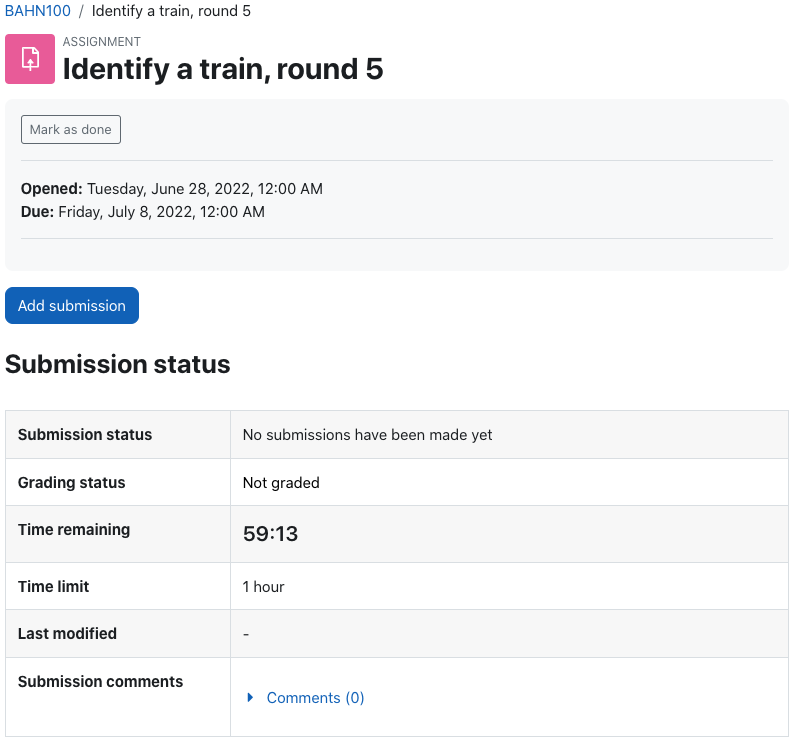
A new feature in Moodle 4.0 is timed assignments. This feature is still somewhat experimental and must be enabled first. Once enabled, you may choose to give an assignment a time limit. A student is prompted to begin the assignment, at which point a visible timer starts running. The time may be measured in seconds, minutes, hours, days, or even weeks, and the clock continues running if the student navigates away. If the remaining time until the due date is less than the maximum time permitted, then the shorter time is used.

In the course of testing, CLAMP uncovered an interesting and important bug (MDL-75087). If the assignment takes file submissions, a student may click on “Add submission” directly from the dashboard and bypass the timer. The next time they visit the assignment the timer will start running, but for short-timed assignments, this is a significant flaw.

We also encountered a somewhat confusing situation: if a cut-off date exists and a student tries to submit when time has expired, they receive a “no permission” error message. It’s possible to see this in untimed assignments as well, so it’s not new, but the message could be improved. We didn’t get a chance to follow up on this issue.

Question bank improvements

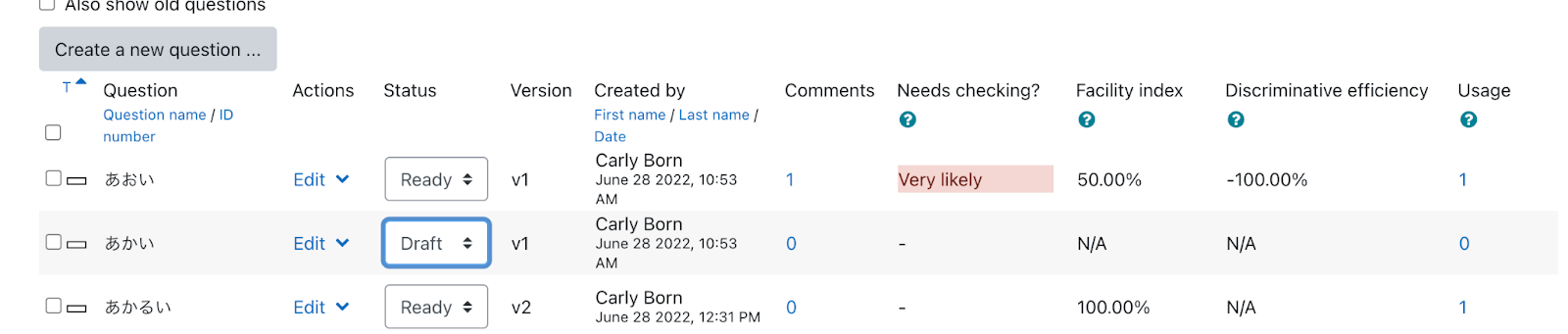
Moodle 4.0 made several changes to the question bank. The question bank list view now exposes the following fields: Status, Version, Comments, Facility Index, Discriminatory Efficacy, Usage. Most of this information already exited but it’s easier to access. You may customize these columns and their sort order in the Site Administration.

Questions may now be versioned. You can’t set up A/B questions but you can choose which version the quiz uses. If you change the version mid-stream the change does not affect existing attempts unless you regrade. This versioning means that you also have access to question history.

LearnR theme

We took a look at the LearnR theme, which is the Moodle 4.0 replacement for Fordson, which a number of CLAMP schools use. LearnR is a Boost derivative with a number of features:

  • Allows the admin to set “unneeded blocks,” these will not be available in the Add a Block menu when this theme is active.
  • You can create custom “buttons” on the dashboard that link to your specified location
  • Marketing tiles could be used for links to other campus resources, allows for pictures.
  • Alert messages can be posted to Dashboard, along with general welcome information.
  • Can put activity navigation (prev & next) in several locations (upper right, footer, etc)
  • Can customize the course display on Dashboard, choosing from a variety of tile and horizontal layouts

We did find and report one bug: text for Authenticated User appears even when not authenticated: https://github.com/dbnschools/moodle-theme_learnr/issues/11.


Summer 2022 Hack/Doc Fest: Event page | Day 1 | Day 2 | Day 3


CLAMP’s Moodle 3.0 and Moodle 3.1 recommendations

The Collaborative Liberal Arts Moodle Project (CLAMP) recommends the use of Moodle 3.0.x and Moodle 3.1.x for use during the 2016-17 academic year. Our recommendation regarding 3.1 includes a caveat to wait for the Moodle 3.1.1 release.

While we have been keeping an eye on Moodle 3.0.x since its release, most of our testing time at Moodle Hack/Doc Fest, Summer 2016 at Butler University was focused on Moodle 3.1. The newest version of Moodle introduces a number of enhancements including a greatly improved metacourse creation interface, a recycling bin plugin, an overhaul of the submission viewer for assignments, and a new “Competencies” plugin.

While we ran into no major issues during our testing of Moodle 3.1, there were two notable display issues that were scheduled to be resolved in Moodle 3.1.1:

Informal polling at Moodle Hack/Doc Fest, Summer 2016 and the CLAMP Moodle Exchange indicates that a majority of schools plan to go with the 3.0.x release because it has been out longer and had more bug fix releases. This follows the typical pattern with new Moodle version adoption within CLAMP schools.

This document is not meant to be a comprehensive review of all of the changes in Moodle 3.0 and 3.1; the full list of updates can be found in the release notes for Moodle 3.0 and Moodle 3.1.

CLAMP has already released Liberal Arts Editions (LAE) of Moodle 3.0.4 and Moodle 3.1.0. The Liberal Arts Edition version of 3.1.1 will be released approximately a week after Moodle HQ releases its version of 3.1.1.

Update 7/28/2016: MDL-54165’s resolution still has user experience issues. Read the update in the “Assignment grading interface and document annotation” section of this report for details and an updated version of the  ad hoc query for identifying courses that use the annotations feature.

Moodle 3.1 Improvements

Meta Course Link Improvements

Moodle HQ has major significant improvements to the Course Meta Link enrollment interface (see MDL-27628). As a result, CLAMP has removed its own version from the Moodle Liberal Arts Edition for Moodle 3.1 and is pleased to recommend the core solution.

Download selected assign submissions as a zip file

Moodle now allows users to select which assignment submissions they want to download, rather than having to download them all at once (see MDL-52490). This is a step forward in functionality but Moodle 3.1 also changes how the zip file itself is generated thanks to the implementation of MDL-52489 (“Download all submissions as a zip” should maintain the folder structure in students submissions”)

The new-style assignments zip file nests the assignment files in folders for each student, rather than using a single folder and prefixing each file with the student’s username and assignment info. This makes the assignment folder less browsable, and will cause teachers to drill down an extra level to view each students’ work. The plus side is that the files themselves are no longer renamed, but this may be offset by the need to browse an additional layer of folders.

Topic Blocks

Topic blocks can now be deleted, which sends their attached resources (but not the topic block itself) to the recycling bin. Topic blocks also can be renamed more quickly, just like activities and resources.

Pinned discussion topics

The ability to “pin” a discussion topic to the top of a forum was added in Moodle 3.1 and works as expected. By default, the teacher role and higher can pin topics, but that capability can be assigned to other roles in the system.

News Forum changed to Announcements

The “News forum” is now called “Announcements”, which is more in keeping with how that forum is used. The forum itself functions the same as before but colleges may want to update their documentation to reflect the change.

Grade Improvements

As of Moodle 3.0, the grades interface has been improved; there are now separate links for “Grades” and “Grade setup” in the Course administration block (see MDL-51051). The latter is the same as “Categories and items”, but makes more intuitive sense since that page is really about setting up and configuring the grade book.

Search Improvements

Search was improved in Moodle 3.1 (see MDL-31989) but it has additional dependencies that may be beyond the reach of many schools: it requires the installation of both the Solr server and the Solr extension prior to Moodle configuration and setup. Based on the documentation, the improved search respects user access and only returns items you have access to. It also appears to search just about all of the standard objects (e.g., book, assignment, forums, etc.). We did not have Solr setup at Hack/Doc so we were not able to test this further.

Moodle 3.1 New Features

Recycling Bin

The recycling bin (see MDL-48012) works as expected and allows a user to restore deleted content such as resources. It is tied to the course, not the instructor so if one instructor in the course deletes something, another instructor in the same course can restore it. By default, items are deleted from the recycling bin after seven days, but admins can change the time limit.

Assignment grading interface and document annotation

Moodle overhauled the assignment grading interface in 3.1, providing a streamlined interface that bakes in PDF annotation. By default the new interface displays the submitted assignment file as a PDF with the typical grading fields (grade, comments, etc.) to the right.

There are two problems with the feature.

  • Converting to PDF: If the submitted document wasn’t a PDF, Moodle attempts to convert it to a PDF. This relies on having an obscure helper utility called “unoconv” installed on the server. If that utility isn’t there (and it’s likely it won’t be) then the conversion fails and the user is left with a blank PDF. This is an issue with Moodle’s requirement checking regime (if you don’t have unoconv, Moodle shouldn’t try to use this feature) that is actively being worked on in MDL-54165 “New grading interface should hide “editpdf” if unoconv is not enabled”. It is set to be fixed in Moodle 3.1.1, so if this isn’t installed, it won’t try and render the PDF.
  • The annotation tool is clunky: Even if everything is working as intended, the annotation tool remains clunky, being akin to adding a simple paint program to Moodle. Previously this was less of an issue because it was not front and center in Moodle’s workflow, but that’s no longer the case with the new assignment grading interface. Comment on MDL-54818 “Improve assignment PDF annotation” if this issue is important to you.

A number of colleges are planning on turning off the PDF annotation component of Moodle until the issues with it are resolved. However, before turning off the feature we wanted to know how many people were using that particular feature in their courses. As a result, we created an ad hoc query that looks for the use the annotation feature in Moodle assignments by identifying occurrences of “comments” and “annotations” in the database.

Update 7/28/2016: Moodle core’s resolution of MDL-54165 adds a new option to switch between three assignment views: PDF only, PDF and grading interface, grading interface only.

However, this does not resolve the issue that we identified at Moodle Hack/Doc Fest, which is that if the unoconv utility is not installed, a blank PDF appears instead of the assignment. This is potentially confusing to end users and we believe it would be better to default to only the grading interface, with no PDF, when the utility isn’t available.

A second design ticket, MDL-55145 “New grading interface should indicate why the document isn’t displayed in the review panel” was opened to deal with this issue. We strongly recommend that people weigh in on this issue with their opinions regarding the interface.

Annotations Ad Hoc Query: Further testing of our annotation query to determine whether annotation was used in a course revealed an error in the logic that caused it to return the wrong results. That issue has been fixed. Get the revised query. Note that it requires the ad-hoc database queries plugin to run (this plugin is included in the 3.0.x and 3.1.x versions of the Moodle: Liberal Arts Edition).

Competencies

Moodle’s documentation defines competencies as:

“Competencies describe the level of understanding or proficiency of a learner in certain subject-related skills. Competency-based education (CBE), also known as Competency-based learning or Skills-based learning, refers to systems of assessment and grading where students demonstrate these competencies. In Moodle 3.1 it is possible to create and apply frameworks for evaluating students against competencies in Moodle.”

We spent considerable time at Moodle Hack/Doc Fest, Summer 2016 reviewing Competencies and came to the conclusion that it’s a complicated new system with an inherent workflow that isn’t well documented.

In brainstorming use cases for competencies at our colleges the scenarios that stood out the most were those where some sort of interdisciplinary or cross-institutional outcomes needed to be tracked. For example, a writing program that establishes a set of skills that students should develop during their time at the college. Evidence of acquiring competency in those skills could be provided in a variety of ways:

  • Evidence submitted by students
  • Evidence submitted as part of a course activity
  • Evidence submitted by faculty for students.

Moodle Competencies handle this through three tools:

  • Competencies: The building blocks of the system, competencies establish a specific goal, and provide a mechanism for giving evidence that the goal has been met.
  • Competency Frameworks: A collection of competencies.
  • Learning Plans: A method for pushing out a particular set of competencies (possibly taken from multiple frameworks) to students.

The single biggest challenge with Competencies is that it assumes you have an existing offline workflow and framework and want to implement it in Moodle. If you have those things, we expect that the tool makes a lot more sense. If you don’t, then the published documentation isn’t going to help you understand the usefulness of the tool or how to implement it at your college.

In addition, Competencies itself has an implied workflow that isn’t obvious to laypeople. For example, there is a process for students or faculty to request review of competency evidence. The per-student requests for such review appear on faculty’s “My Moodle” page, but it’s not clear if there is a place where faculty or learning plan managers could go to see the progress of an entire student cohort (e.g., not just an individual student’s progress toward meeting competency goals, but the entire cohort’s progress).

The development documentation does a much better job of explaining the purpose of Competencies and does a better job of explaining how the various pieces fit together.

Moodle 3.0/3.1 Plugin Review

We compiled a list of popular 3rd party plugins for Moodle and then determined if they were compatible with 3.0 and 3.1. Of particular note were the following plugins, which list compatibility with 3.0 but not 3.1:

  • Course Overview
  • TurnItIn
  • McGraw HIll

Course Overview was tested under 3.1 and seemed to work just fine. That said, the way it is configured changed in 3.1; it is now difficult to get to all of the settings on one unified page.

View the full list of third-party plugins.

About this report

This report was compiled based on work done at Moodle Hack/Doc Fest, Summer 2016 at Butler University. The following individuals contributed to it: Jason Alley (Lafayette College), Joe Bacal (Smith College), Deryl Botta (Butler University), Kristi Burch (Centre College), Adam Dinnes (Beloit College), Charles Fulton (Lafayette College), Ken Newquist (Lafayette College), Ruth Schwer (Butler University), Jedidiah Rex (Beloit College), and Matt Wright (Butler University).

Questions about the report can be sent to info@clamp-it.org.