Tag: completion

Summer 2026 Hack/Doc Fest at Kalamazoo

CLAMP held its Summer 2026 Hack/Doc Fest at Kalamazoo College in Kalamazoo, Michigan. This was CLAMP’s second visit to K College, after the Summer 2012 Hack/Doc Fest. The primary focus this time around was the new Moodle 5.2 release, plus continuing follow-up on the issues with the question bank in Moodle 5.0. In addition to this overview, please see our separate post on changes to the login page.

Issues specific to Moodle 5.2

Question bank

The ongoing changes to the question bank have featured in the last few Hack/Doc Fests. The changes we tested in 5.2 are principally cosmetic/quality-of-life, and they all worked as expected:

  • Make question bank categories collapsible: the child categories can be hidden and displayed below their parent categories.
  • In-place editing of question bank category names: clicking the pencil icon allows for immediate name modifications.
  • On the question bank page show amount of questions for each bank: what it says on the tin.
  • Move entire question categories, complete with questions and subcategories, to a different question bank: worked as described.
  • Align in-place editing of question names with activities/category name editing behavior: question names were editable in-place and aligned as expected.

Problems remain with importing large question banks from pre-Moodle 5.0 instances. As described in January’s report, importing category-level questions triggers numerous non-fatal warnings that look like errors. We also encountered a problem with asynchronous backup/restore and questions that will be described below.

Asynchronous backup/restore of quizzes

We tested restoring a large Moodle 4.5-era course with a large and complex question bank. The restore failed, and caused the development server to run out of memory and crash. There are two bugs in play here. One, is that the backup/restore subsystem can get stuck in a loop and run out of memory. A mitigation of that problem is described in MDL-81511. We tried both patches and they both worked.

The underlying problem is less clear. We think the issue comes down to the following category structure in the associated question bank:

  • Parent category 1 (1+ questions)
    • Sub-category 1 (1+ questions)
  • Parent category 2 (1+ questions)
    • Sub-category 2 (0 questions)
      • Sub-category 3 (0 questions)
        • Sub-category 4 (1+ questions)
        • Sub-category 5 (1+ questions)

Attempts to reproduce the issue with a bare-bones structure matching the above were unsuccessful. Modifying the original backup by adding a question to the first empty category did resolve the issue. We didn’t report the problem to HQ yet because we hadn’t narrowed it down sufficiently.

Marking workflow

Moodle is starting to make a push around the marking workflow feature (MDL-86006). We looked at this in 2014 and thought it could be “handy.” The marking workflow now supports multiple markers (read: graders) and grade calculation methods.

Enabling Marking workflow in an assignment provides a workflow that requires grades to go through a series of stages before they’re released to students. A mark is a separate value (a “provisional grade”) set by a “marker.” Markers need to have the role of teacher or non-editing teacher and they are allocated to mark (not grade) specific students. The new functionality in 5.2 is that you can now have multiple markers provide a mark for a single assignment.

This seems like it could be particularly useful in large courses with TAs. The marking workflow does not work with rubrics.

Completion conditions

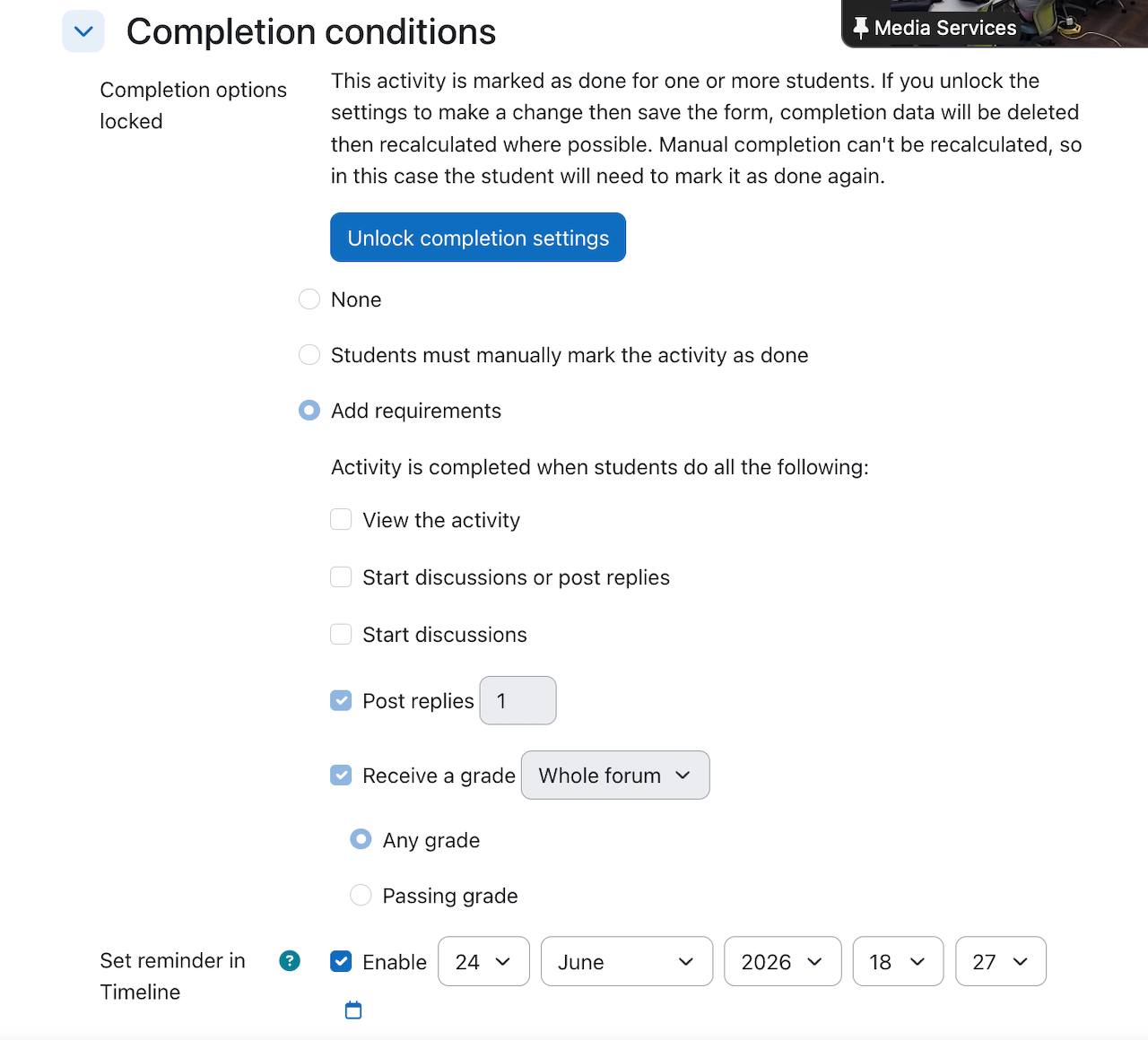
The completion criteria, activity dates, and completion actions are reorganized to sit prominently at the top of the activity page. If you were to set a completion requirement for a forum that is also graded, students can check off the completed activity even though they didn’t actually complete the forum. They won’t get a grade. The instructor has to add the grade manually. So the completion requirement is just used as a checklist.
Documentation updates to consider for 5.2

In this section we’re flagging areas where you might want to update your internal documentation when upgrading to Moodle 5.2.

  • Q&A Forum: acts more like a live forum – could be used for polling
  • Marking Workflows for the Assignment Activity: doesn’t work for rubric grading.
  • New login screen: for schools not using SSO authentication methods
  • Question Bank: can edit categories directly now, drag and drop/move categories, can see questions used in course, move categories to another course, etc.
  • Completion Requirements: act more as a visual checklist. Can be tied to competencies.
  • Restricted Content: clearer information displayed. The process is still the same but may need to update screenshots to reflect the new display.
  • Subsection anchor links: screenshots may need to be updated to reflect the new look. The new option to duplicate subsections should be reflected

Other issues

Timeline/Calendar/Upcoming Event and overrides

We’ve noted before that there are inconsistencies related to the Timeline, Upcoming Event, and Calendar blocks and the presentation of user and group overrides in assignments. There are at least three tracker items addressing aspects of these problems:

  • MDL-77441: Activity overrides NOT display correctly in the Timeline block 4.1
  • MDL-79989: Group overrides dates/times do not display correctly in calendar, upcoming events, and timeline for students in courses IF they are enrolled elsewhere in the site as a teacher
  • MDL-81004: Timeline doesn’t check the group or individual exceptions dates in some date filters

We think we’ve identified the root problem and we’ve posted a patch to MDL-77441 for review. It’s complicated to explain, but at root the problem manifests if the you’re looking at a particular window (say the next 7 days), and the original event falls within that window but the override does not.

H5P activity accessibility

We’ve looked at H5P before, most notably at the Winter 2021 Hack/Doc Fest. This time around we looked the accessibility of various activities, and how to disable individual types at the site level. It’s important to note that you can download types from h5p.org that were not evaluated for WCAG 2.1 AA conformance and are not maintained by the core team. All content types are enabled (visible) by default, but not all are recommended by the core team.

You can disable (hide) a content type in Site administration > General > H5P > Manage H5P content types. There’s a significant caveat, however. The H5P Page type (formerly called “Column”), allows adding H5P types to itself and ignores whether the type is disabled at the site level. This is a long-standing bug (MDL-77675) and hasn’t yet been addressed.

Off-label uses of course import and restore

It’s possible when restoring a Moodle course from a backup file to advance the dates of the resources to match the start and end date of the target course. To do so, you need to make the following choices when restoring the course:

  1. From the restore menu select any of the options, noting that the options to create a course will require you to set a start date.
  2. For any restores into existing courses, Set “Overwrite Course Configuration” to “Yes”.
  3. Uncheck the overwrite checkboxes for short name, full name, and start date.

In this configuration, the restored resources will have start and end dates recalculated from the target course’s start and end date, as opposed to whatever was in the backup. This is an alternative approach to using the Edit Dates report to bulk-update dates after the restore.

All well and good. The challenge is that this workflow isn’t possible when importing from an existing course, which means it’s not available to faculty if their course backup size exceeds the maximum upload size for the server. This functionality has now been requested in MDL-89095.

Remove reliance on color to convey information in Calendar View

In the full calendar view (/calendar/view.php) there are three view options, Month, Day and upcoming events. The events key in the Block Drawer shows there are 6 types of events and each one has a corresponding color that the event will appear on the calendar/event in the different views. In Day and Upcoming Event View there is an indicator of what type of event it is being viewed:
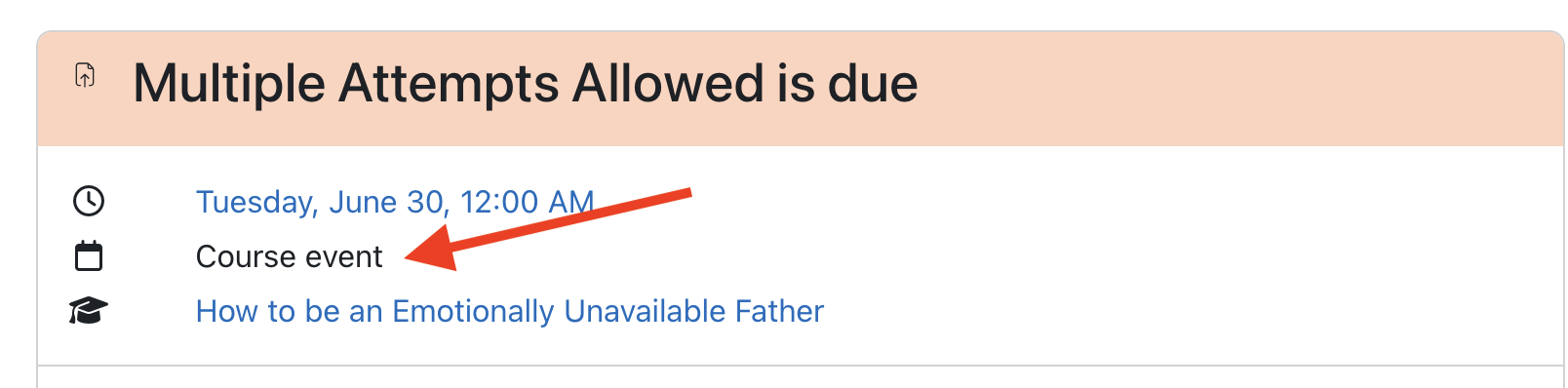
Dialog describing an event

In the calendar view the only indicator of event type is the color unless you click an event and bring up the modal dialog which brings up a view similar to above:
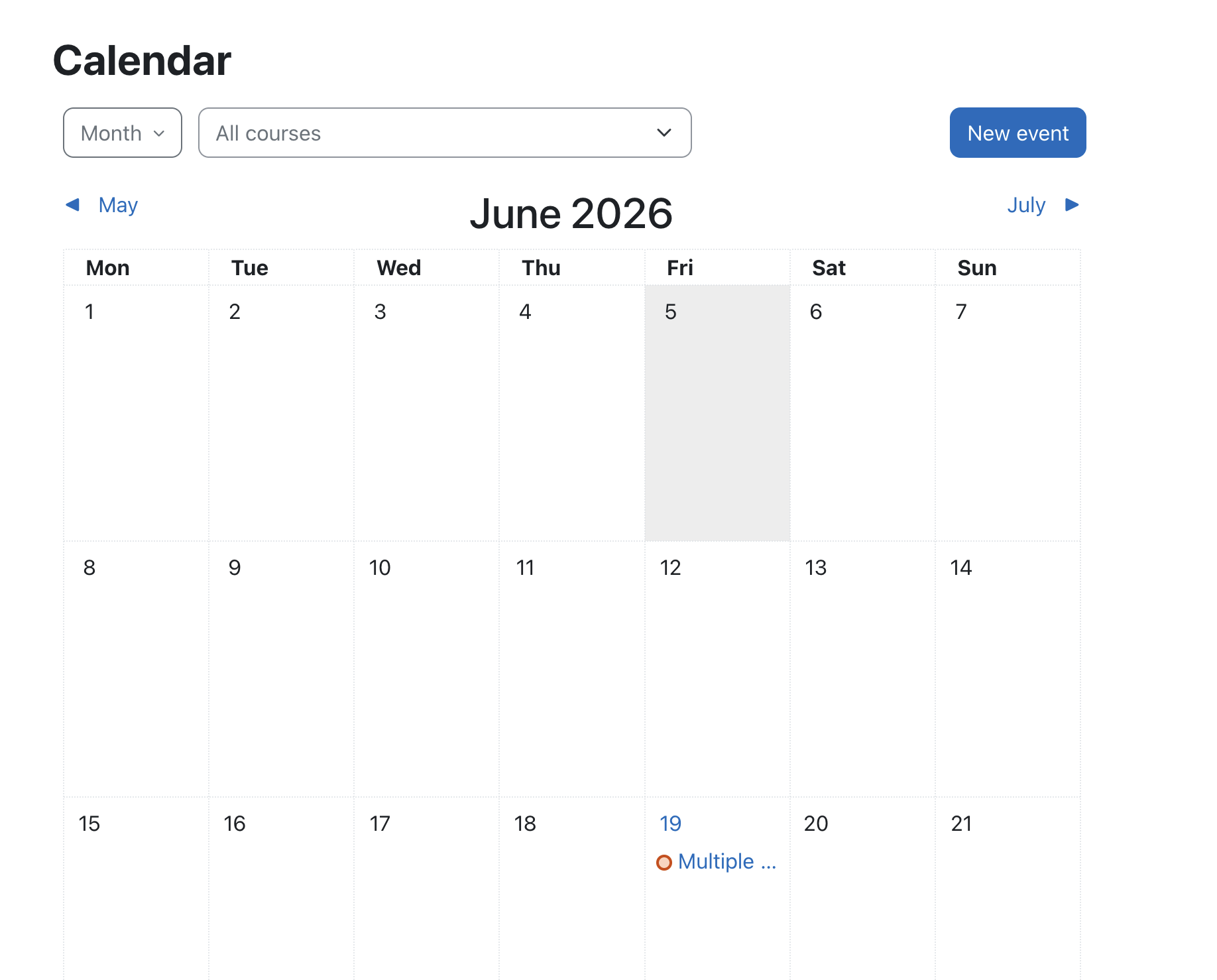
Calendar view. There is an event indicated by color alone.

WCAG states color shouldn’t be the only means of conveying information. On the Calendar View, it would be ideal if this color information was backed up by an image or other form of secondary encoding. This would facilitate information transfer for color vision deficient (colorblind) users. We’ve reported it to HQ as MDL-89011.

H5p content types not available on clean install

Using h5p requires the content types. These need to be downloaded. There’s a monthly task for keeping these in sync (\core\task\h5p_get_content_types_task). This is scheduled to run at a random time on the first of the month, so you could potentially go a month without types available on a new install. There’s a tracker item (MDL-80031) but no workaround beyond running the task manually.

Summary

We took an informal poll of seven participating schools as the Hack/Doc Fest wrapped up. Four were planning on upgrading to Moodle 5.1 for the Fall 2026 semester, two were planning to stay on Moodle 4.5 for another year, and one was planning on upgrading to 5.1 or 5.2. No one had any real concerns about running on either 5.1 or 5.2. The relative lack of major issues in 5.2 permitted us to take some deep dives into longer-standing issues, such as the override display issue, H5P modules, and calendar accessibility.
Winter 2025 Hack/Doc Fest at Lafayette

CLAMP held its Winter 2025 Hack/Doc Fest at Lafayette College in Easton, Pennsylvania. The primary focus of the event was evaluating Moodle 4.5. We’re happy to report that we encountered no major issues and no blockers to upgrading to Moodle 4.5 this year, although you should take careful note of the new image redaction functionality. Please read on below for for details of the various issues we discussed.

Issues

Subsections

Sub-sections (mod_subsection) are a new feature in Moodle 4.5. This is a great way to organize materials within a topic block. In the past, you needed to use labels and indented items to group items within a section. With this feature, you can create a subsection that is collapsible within the section. We found it difficult to drag-and-drop items from a local folder directly into the subsection, but it is easy to move items into the subsection once they have been added to the topic block itself. You can click on “Add an activity or resource” within the subsection to add content directly to the subsection. You can have multiple subsections within the topic block, but you can’t nest another subsection within an existing subsection.

Scrolling across pages when annotating Assignments

Assignment annotation allows only for clicking through multiple pages. This is cumbersome when trying to flip across multiple pages when annotating. A proposal to allow scrolling instead made some headway in 2020 before the author abandoned it. CLAMP has updated and resubmitted the fix and will work with Moodle HQ to get this feature added.

Image redaction

There is a separate blog post discussing the new image redaction feature in Moodle 4.5. The short version: if you enable it, make sure that you also install exiftool and configure Moodle to use it.

Assignment submission default order

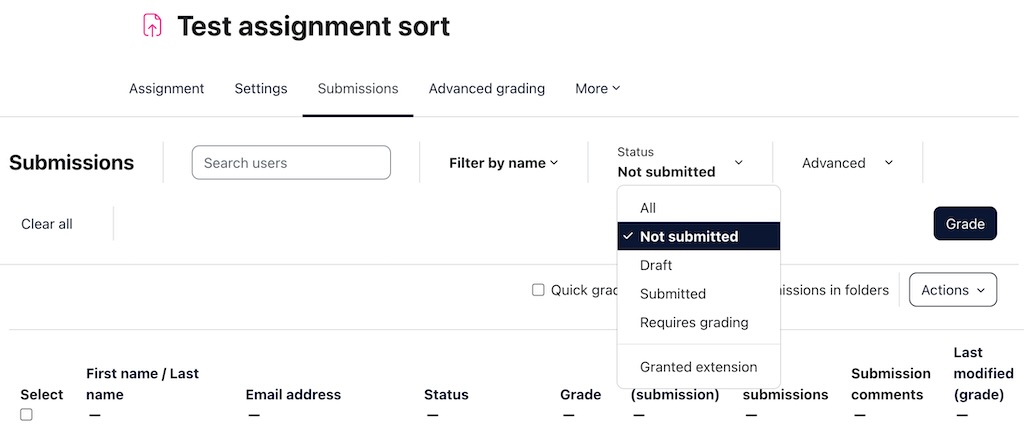
The first time you view submissions in an assignment, they’re sorted by the internal Moodle userid of the submitter. It appears non-deterministic and can confuse faculty. Once you’ve sorted by something else (last name, submission date) that choice persists through logout, but the initial presentation is confusing. CLAMP has submitted a feature request and patch to change this behavior to last name of the submitter.

New notifications

Moodle 4.5 adds new options to notify students of upcoming assignments and quizzes. By default, each user decides what notifications they want. Administrators can change this default. New notification options include the following:

  • Assignment due in 7 days
  • Upcoming assignment due (48 hours before the due date)
  • The assignment is overdue.
  • Quiz opens soon

There is no way for an individual instructor to configure these options or to force a push.

Optional questions for Quiz

Carleton was interested in a Quiz-like activity where students have the option to answer specific questions within a category. They would only be graded for the questions they answered. This is an example point system:

  • 15 multiple choice questions worth 2 points each
  • 5 essay questions about terms (only 3 are required)
  • 5 more essay questions (only 4 are required)

We looked at ways of accomplishing this:

  • A teacher can add a multiplier to the Quiz activity only if all questions are worth the same number of points
  • Changing the Maximum grade to be below the total number of points will only cause the question points to be recalculated in the Results page
    • It still counts all the optional questions
    • Unlimited Grading does not fix this issue
  • Workaround: Create Quiz questions listing all potential question prompts a student can answer.
    • Example: three essay questions with all five essay prompts.
    • Students have to write out what question they are answering

Other avenues to explore:

  • Try lesson activity
  • Maybe branching (conditional formatting)
    • Branching depends on whether want to give students the option to answer all questions for extra credit.
    • Branching is available within a Questionnaire, but not within a Quiz. However, the Questionnaire does not appear to have any auto-grading features (beyond assigning a grade for completion).

Exploring Competencies in Moodle

We took another look at Competencies, a perennial topic at these events. Coming out of Butler in 2016 we called them “a complicated new system with an inherent workflow that isn’t well documented.” Occidental published some documentation about them at Smith in 2019. We took another look at them as an offshoot from the optional Quiz questions work. Findingss:

  • Administrators can build a site-wide template: Site administration > General: Competencies > Competency frameworks
  • Taxonomies are just labels for nesting: 4 level options.
  • Teachers cannot create competencies; they can only pull competencies out of existing frameworks.
  • Teachers can assign competencies to specific activities and resources or just add the competencies to their course in general.
  • This could be useful for programs with a graduation requirement. An example is Carleton’s Writing Portfolio where students upload 3–5 pieces of writing from different courses plus a reflective essay.

We helped unearth two bugs while looking at Competencies this time around: MDL-84147 and MDL-84148.

UX changes to the assignment submissions page

The assignment submissions page has new menus, filters, and headers (See https://moodledev.io/general/releases/4.5#assignment-improvements—phase-1 for a full list). More changes are planned. We liked the new assignment options. All the selection options moved to the top. You can filter by submission status (i.e. submitted, not submitted, draft).

Moodle assignment interface with filters active

AI subsystem

There is a separate blog post discussing the new AI subsystem in Moodle 4.5. OpenAI and AzureAI are supported; we were able to evaluate OpenAI.

Open Badges 3.0

Moodle is working toward supporting Open Badges 3.0. This work will be spread across multiple releases. Two improvements landed in Moodle 4.5:

  • MDL-43938: The uniqueness requirement for badge names has been removed.
  • MDL-82057: Badges can be imported from one course to another using Course Reuse> Import. The imported badge has all the metadata of the first badge, but none of the issuing criteria. It’s also not active. The image is properly deduplicated.

Report Builder

We evaluated numerous improvements to Moodle’s Report Builder, all of which worked as advertised. The biggest is the ability to delete multiple cohorts at once:

  • MDL-52046: this is the option for deleting multiple cohorts at one time.
  • MDL-81330: can now filter based on the cohort within the class participants window.
  • MDL-80123: admin preset reports now work correctly (previously, there was a bug around deleting presets).
  • MDL-82331: time filtering can now go down to the minute (previously could only go down to the hour). It passes.
  • MDL-82529: adding the option to filter cohorts by custom fields.
  • MDL-81399: The relational database now has fields for users’ time zones and languages. As a result, it’s possible to use these to filter custom reports.
  • MDL-82114: Can now filter by the plugin when creating a custom report from the “Files” source.
  • MDL-82512: Can now filter by the plugin when creating a custom report from the “Author” source.

Audio-video recording in TinyMCE

Tiny MCE offers built-in features for recording audio and video. These updates expand the offerings so users can create screen recordings and recordings can be paused and resumed.

  • MDL-81212: Tiny/RecordRTC: Add Screen-recorder button.
  • MDL-81111: Tiny/RecordRTC: TinyMCE conversion – add a “Pause” button for recording A/V.

Completion tracking

Restoring old courses brings up a weird assortment of completion tracking settings. Sharon Strauss from Haverford created this short video about completion tracking to show people what these settings are and how they can quickly change the settings:

What’s next?

Save the date! The Summer 2025 Hack/Doc Fest will be at Swarthmore College in Swarthmore, Pennsylvania, from June 10-12.

Winter 2021 Hack/Doc: Day 2

The participants filter in Moodle 3.9

Work on the task list continued during Day 2 of the Winter 2021 Moodle Hack/Doc Fest as our attendees juggled Moodle and the meetings from which Hack/Doc no longer provides any escape.

From the task list

Participants filter

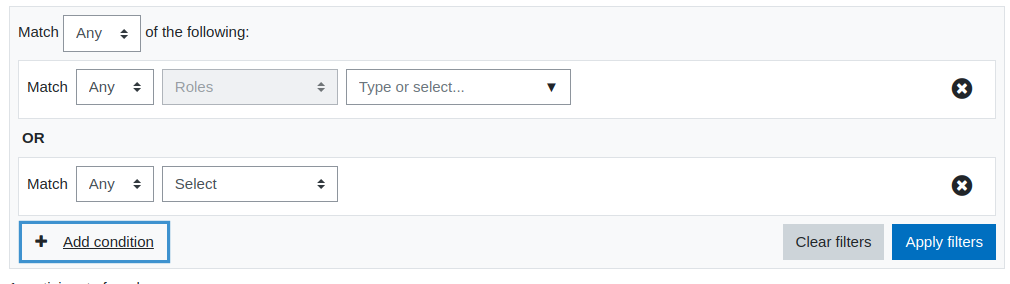
Core has continued its improvements to the participants page. You can now filter participants using various criteria such as enrollment method, role, status, keyword, and group membership (if the course has groups).  You can also chain filters together using OR or AND, but not a mixture. One weird aspect is that once you select a filter field (eg, Role, Enrollment Method), you can’t change that directly from the dropdown — you have to delete the filter row and recreate.

Activity chooser

The activity chooser is configurable now. It supports a tabbed interface with five groupings: Starred, All, Activities, Resources, and Recommended. Starred is per-user, similar to starred courses. Recommended is defined by the site administrator, allowing you to promote certain activities and resources over others.

Go to top

There is now a “go to the top of the page” button. This can help with the “scroll of doom” problem on very long courses. We tested it on desktop, mobile, and tablet environments:

  • On the desktop and iPad, the Go to top button only appears when you’ve scrolled a lengthy enough distance AND only when you’ve reached the bottom.
  • On mobile, the Go to top button only appears when you’ve scrolled a lengthy enough distance AND only when you’ve reached the bottom. The button sometimes doesn’t display when you’ve hit the bottom. For instance, when Safari hides its bottom navigation toolbar to give a full-screen view, the button didn’t always display.

Scrolling timer for your quiz

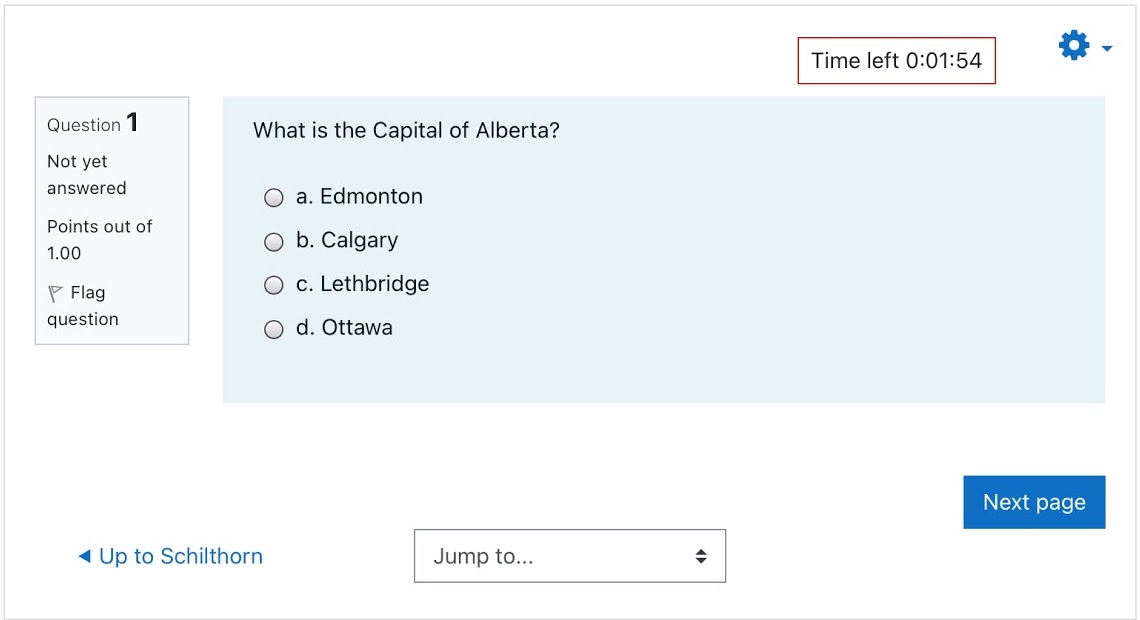
Moodle 3.10 adds a scrolling timer for quizzes. The timer displays as a timer inside of a red box within the quiz. It doesn’t disappear until the quiz is submitted. It stays at the top of the screen even as you scroll through a page of questions. With 16 seconds remaining, the timer begins displaying a red background and gets darker each second. With 6 seconds remaining, the text changes to white and the background gets even deeper red. We did think the default styling could be improved.

The scrolling timer in a quiz

Previous activity with completion

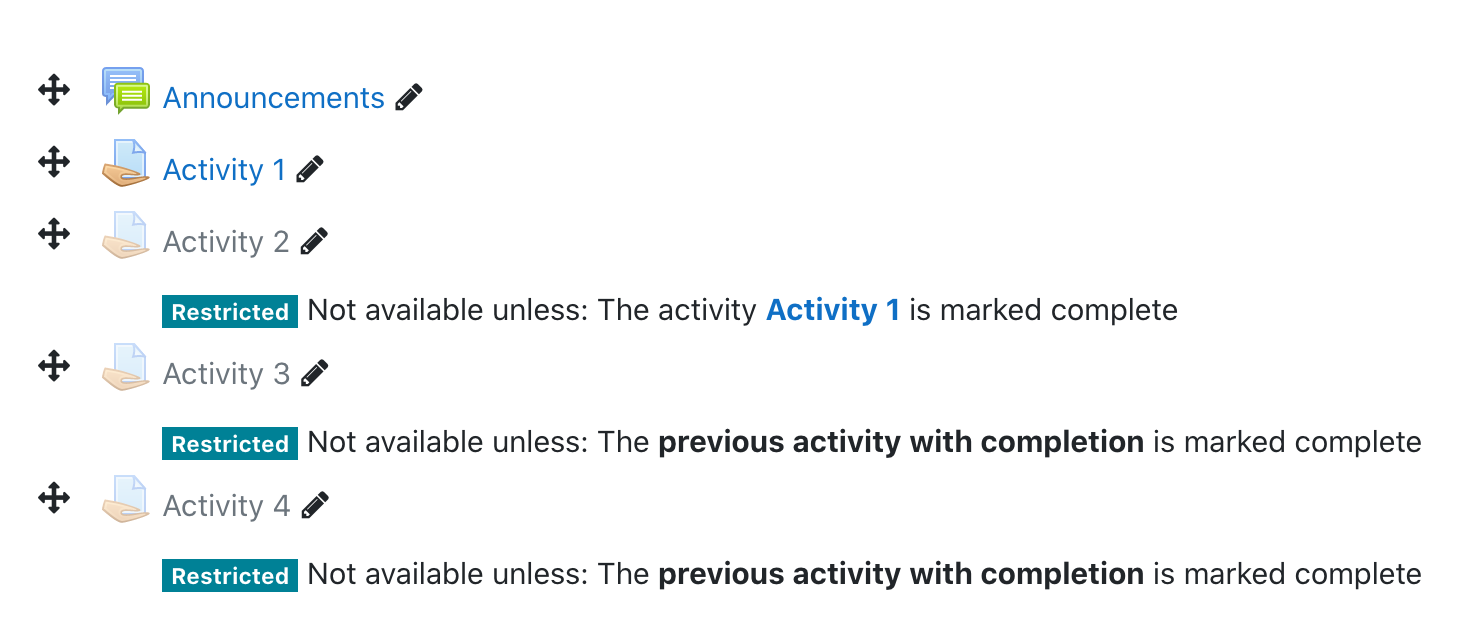
As of Moodle 3.9, it is possible to base restricted access on the completion of the “previous activity with completion“. Rather than specifying an activity by name, you can now effectively specify “the one before this one.” When editing is on, the teacher can see whether the dependency is absolute (a specific activity) or relative (the previous activity). If there is no previous activity, Moodle will tell us that we are missing a referent. This is calculated without regard for activity visibility. There are various reasons why an individual student might not see an activity: the activity could be hidden or it could be accessible only to students in a certain group. The option to base dependency on a previous activity with completion does not appear until the course has at least one activity with completion.

Previous activity with completion in Moodle 3.9

Better task management

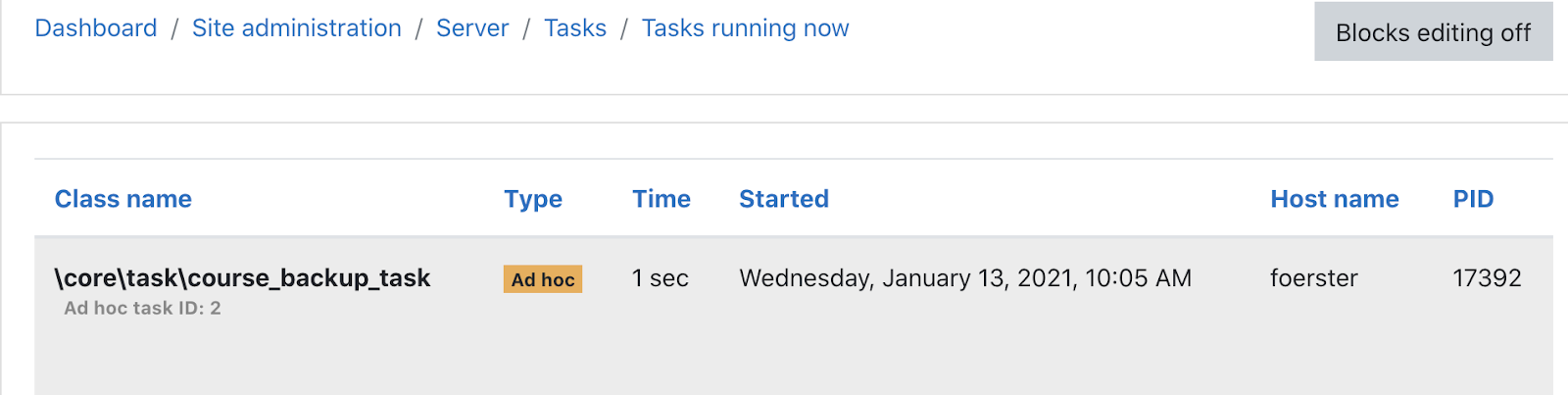
Moodle 3.10 adds a “Tasks running now” link in the Site Administration > Server > Tasks page. This is useful for checking long running tasks or potentially correlate system slowness with background task processing. There is an AJAX refresh button on this screen. There is also now in Site Administration > Server Tasks > Task Processing the option to disable cron from the interface. This would be useful when doing maintenance tasks.

Course copy

Moodle 3.9 added the ability to “copy” or duplicate courses from the web interface. This uses the ad-hoc task and backup functionality and therefore requires that corn is enabled and that you not alter the course once you trigger the copy. By default, this feature is restricted to managers and administrators. It does not enforce naming conventions, unlike Course merge helper and similar plugins. Our impression is that copying a course is faster than importing a course. We think a good use case would for copying template courses in non-for-credit scenarios, such as committees or student groups. It does bring over grade book weighting, and you can choose whether to copy user data. For those schools that use the templated course creation plugin, these two features do not conflict, because this feature does not trigger the course creation event.

Copying a course in Moodle

Winter 2021 Hack/Doc Fest: Event page | Day 1 | Day 2 | Day 3