Tag: gradebook

Winter 2026 Hack/Doc Fest at Connecticut

CLAMP held its Winter 2026 Hack/Doc Fest at Connecticut College in New London, Connecticut. This was CLAMP’s second visit to Conn College, after the Winter 2024 Hack/Doc Fest. The primary focus this time around was the new Moodle 5.1 release, plus follow-up on the issues with the question bank in Moodle 5.0. In addition to this overview, please see our separate posts on data privacy and the safe exam browser.

Issues specific to Moodle 5.1

Question bank

The changes to the question bank in Moodle 5.0 required their own separate blog post to hash out. On the whole, folks felt better about the question bank in Moodle 5.1. That said, there are still some issues to be aware of.

Sharing question banks from the course level

We evaluated how to share question banks (QB) between courses now that there are no category-level question banks. In this example, we have Course 1 and Course 2 taught by Teacher 1 and Teacher 2. Teacher 1 can create a course-level QB in Course 1. Then they join Course 2 as a Teacher and import a quiz from Course 1. This quiz has 3 questions from the Course 1 course-level QB. Teacher 2 cannot edit those questions. Course 2 also does not have full access to the course-level QB in course 1.

If Teacher 1 edits a question in this quiz from their one in Course 1, it is also changed in the instance in Course 2. In the case that the quiz has been attempted, the Teacher 1 can change the the question. The student who had attempted the quiz still sees the original question, but future students will get the new version of the question unless the faculty explicitly chooses the question version in the Quiz settings.

If Teacher 2 duplicates the quiz, then they get a copy of the quiz but the questions are copied into a new “System shared question bank” in Course 2. Teacher 2 can edit that copy of those questions. But it is strange that they are dumped into a “System shared question bank” rather than in a quiz-specific question bank.

Restoring quizzes from Moodle 4.5 to Moodle 5.1

There are still some challenges with importing quizzes from Moodle 4.5 to Moodle 5.1. We tested with quizzes from a school’s production 4.5 instance. The first issue is that we saw a number of non-fatal errors that nevertheless had the red background that usually indicates a more serious issue:
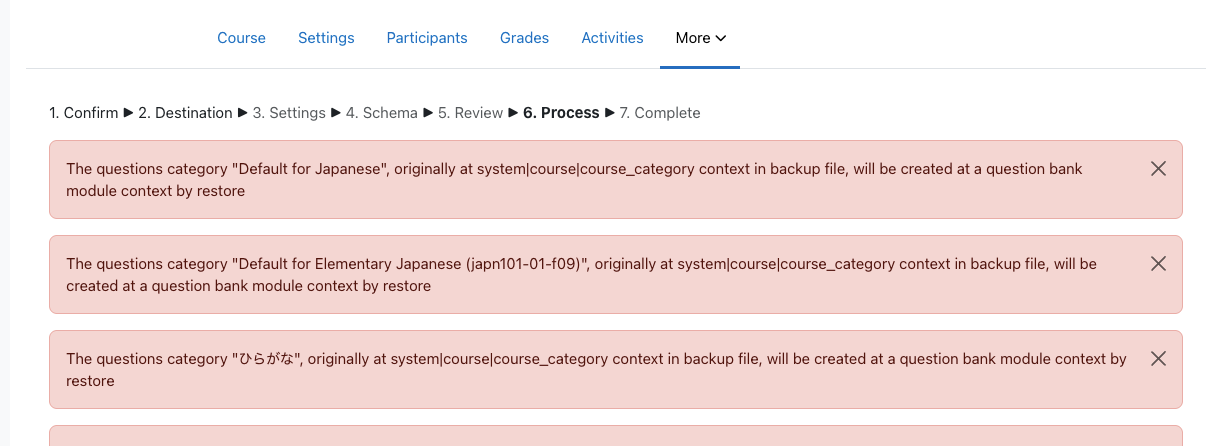
Moodle displaying a series of non-fatal errors when importing questions
Category-level questions will be stored course-level question banks

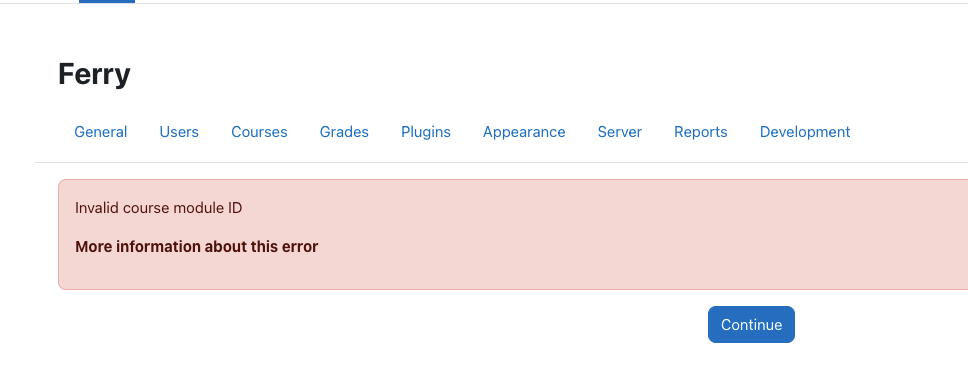
These are all questions that were heretofore stored at the category level. Some of these questions contained Random questions from specific categories. The questions appear to load, but clicking on the “See questions” link on the Random Questions causes a fatal error:
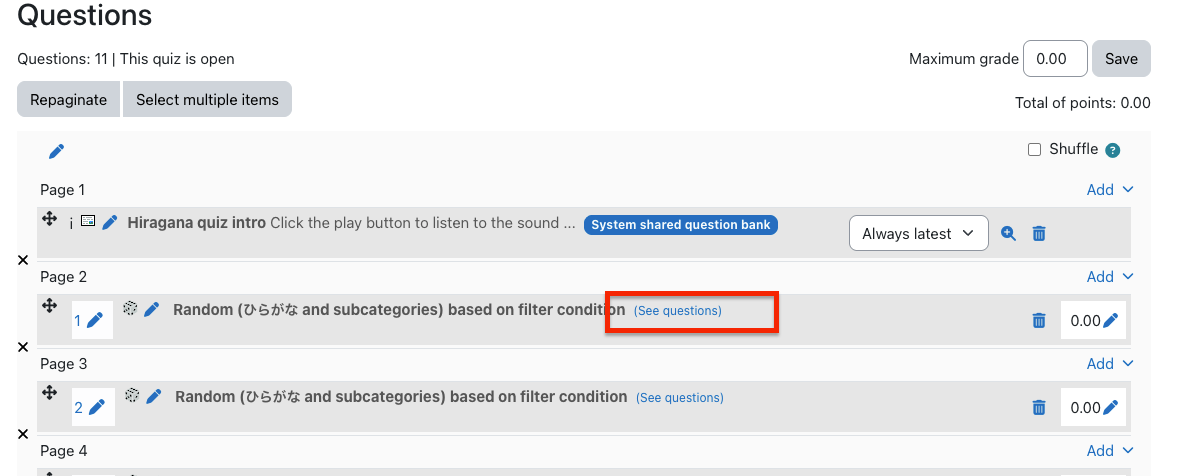
Moodle question bank with list of questions

Moodle fatal error about invalid course module ID

As of yet, we cannot view the list of questions in the categories for these quizzes. The course-level question bank shows the list of quizzes, but clicking on them takes you to the quiz itself, and does not show you the list of questions in the category from which these Random questions are pulled.

Regular multiple-choice questions are labeled with “System shared question bank.” However, if I go to the course-level question banks, even though I see a System shared question bank (created from previous testing), the imported multiple-choice questions are not there. Site home does not have any question banks.

Conclusion: the questions are clearly there. But they are “hidden” in some kind of secret question bank. Use extreme caution when importing quizzes from previous versions into Moodle 5.1.

Activity overview

Activity overview is another feature that saw changes in Moodle 5.0 and was further improved in 5.1. It’s been extended to include dates and completion information for BigBlueButton, Choice, Database, Forum, Glossary, H5P, Lesson, SCORM and Quiz in addition to Assignment, Feedback, Resources, and Workshop.

Admin search improvements

Moodle carried out research into the information architecture (IA) of the site administration interface. Among other outcomes, this research identified a need to improve search within the administrative interface. The first improvement to land is MDL-85518, returning search results in a more intuitive order.

Server configuration

For self-hosted schools, Moodle has made a major change in its code layout for the 5.1 version. This is done to permit the introduction of the “router” feature and prettier URLs. Most of the public code that was previously in the root of the code base is now in a public subdirectory. Your config.php still lives in the root. Also still in the root is admin/cli/ with various tools, including cron.php. You’ll need to make various one-time adjustments to your deployment to accommodate these changes. Included below is the Apache configuration for CLAMP’s Moodle 5.1 test environment:

<VirtualHost *:443>
    ServerAdmin admin@clamp-it.org
    ServerName ferry.clamp-it.org
    DocumentRoot /var/www/ferry/site/public

    ErrorLog ${APACHE_LOG_DIR}/ferry-error.log
    CustomLog ${APACHE_LOG_DIR}/ferry-access.log combined

    <Directory "/var/www/ferry/site/public">
        AllowOverride None
        Require all granted
        DirectoryIndex index.php
        FallbackResource /r.php
        <FilesMatch \.php$>
            SetHandler "proxy:unix:/run/php/php8.3-fpm-ferry.sock|fcgi://ferry/"
        </FilesMatch>
    </Directory>

    <Proxy "fcgi://ferry/">
    </Proxy>

    SSLCertificateFile /etc/letsencrypt/live/ferry.clamp-it.org/fullchain.pem
    SSLCertificateKeyFile /etc/letsencrypt/live/ferry.clamp-it.org/privkey.pem
    Include /etc/letsencrypt/options-ssl-apache.conf
</VirtualHost>

Section limit deprecation

Moodle has deprecated the maxsections configuration setting; going forward there will be no limit to the number of sections a teacher can add to a course. Out of curiosity, we used Moodle WebService Manage Sections plugin to bulk add 500 sections to a course (ironically, that plugin hasn’t be updated to reflect the change to maxsections). The course and navigation were functional afterwards.

Manual enrollment notifications

Manual enrollment notifications are sent immediately regardless of whether the enrollment is active. This has to do with how enrollment status is tracked in the database. There are only two states: enrolled or suspended. The start and end times are tracked separately. Moodle calculates whether an enrollment is active based on the time constraints, but it doesn’t go back to the database. It would be onerous for cron to check every minute whether an enrollment has become active.

That does leave the question of the message to the user. The default message for a new manual enrollment, as defined in the language string enrol/customwelcomemessageplaceholder, is this:

Hi {$a->firstname}, you are enrolled in the course {$a->coursename}.

Moodle allows teachers to override this on a per-course, per-enrollment method basis. It’s buried in the course navigation, in Course > Participants > Enrolment methods > Self enrolment (or Manual enrolment), if you edit the method. Moodle provides numerous placeholders for programmatic customization:
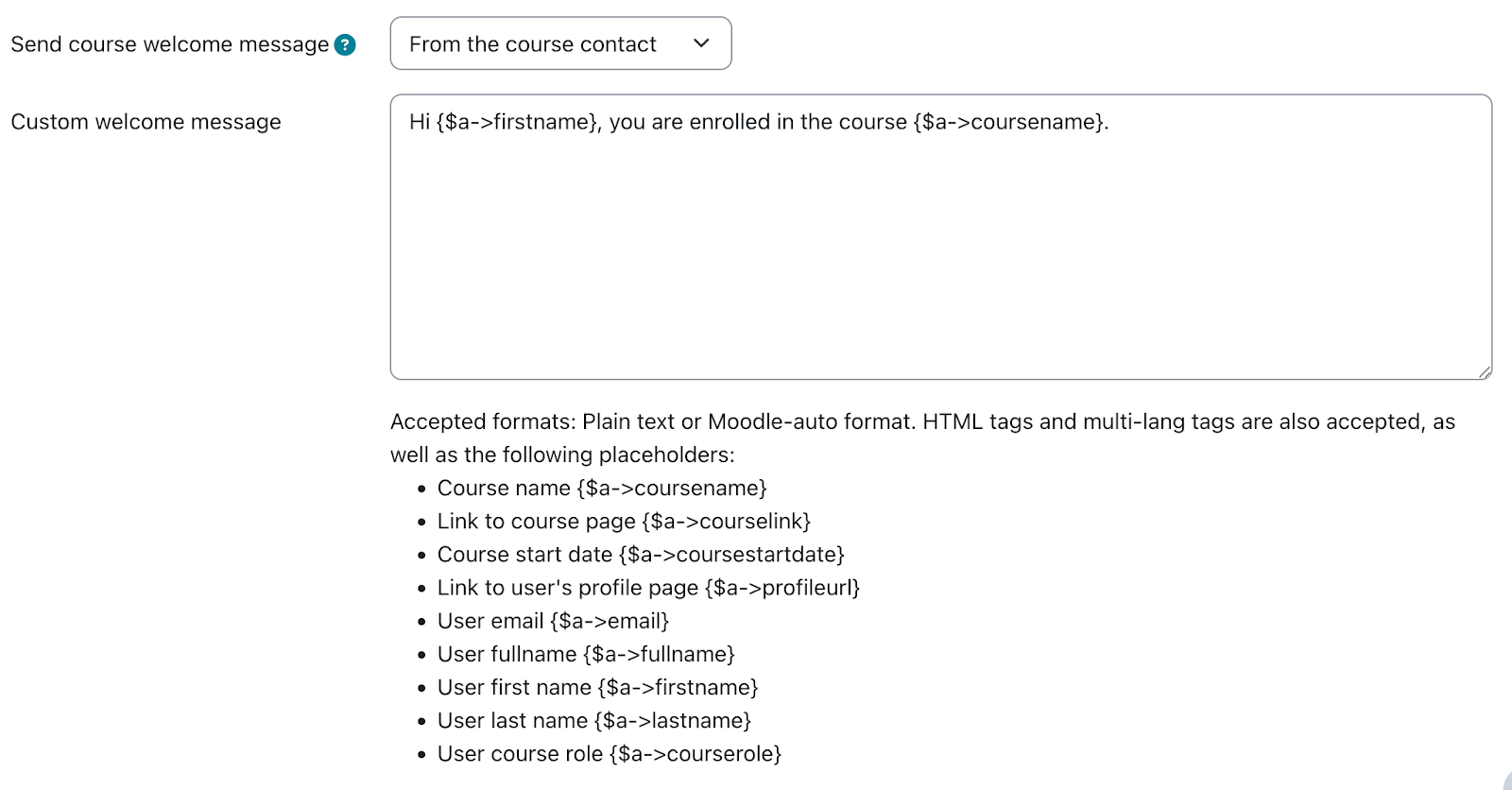
Moodle string customization interface with different placeholders

One thing that’s missing here is the enrollment start date, as opposed to the course start date. Moodle 5.1 added the ability to set an arbitrary state date for a manual enrollment. We’ve proposed a change (MDL-87665) to make that value available to the message customization.

Activity chooser

The activity chooser has a new look and feel. You can still “star” activities, which are now grouped functionally: Assessment, Collaboration, Communication, Resource, and Interactive content. These categories are fixed and can’t be modified. New activities are added to “All.”

Other issues

Phantom grading changes in the gradebook

There is a bug in Moodle that can lead to unexpected changes in the gradebook. When using Google Chrome, with grader editing turned on, if a user uses two-finger scroll or mouse wheel scroll they can change grades unintentionally if the cursor was hovering over a grade cell. On CLAMP’s development environment we could only reproduce this if the user’s browser had the Lastpass extension enabled. Macalester can reproduce the issue in production without the extension.

Core is tracking the issue in MDL-86837. A workaround is to add the following Javascript snippet to Site administration > Appearance > Additional HTML section > Before BODY is closed:

<script>
document.addEventListener("wheel", function(event) {
if (document.activeElement.type === "number") {
document.activeElement.blur();
}
});
</script>

Ongoing issues with group overrides on assignments

We documented some issues with group overrides in assignments at the Summer 2025 Hack/Doc Fest (“Overrides don’t appear properly at times“). There’s another issue, MDL-81004, related to how overrides appear on the timeline in the dashboard.

Here’s an example of the issue in question. Create an assignment with a default due date of midnight, 7 days from today. Create a Group Override and change the due date to be one month later. (Don’t do this testing in February because the shorter month might make it weird). This means the overridden due date is more than 30 days into the future.

Now, log in as a student in the date override group and navigate to the dashboard (in default config) so that the Timeline and Calendar are visible. Given that the calendar is showing the current month and the timeline is set to next 7 days; on the Timeline and calendar the original due date is shown, not the overridden date.

As the student, change the timeline to next 30 days, and the wrong due date (not applying the override) will still appear on the timeline. Still as the student, change the calendar to next month and timeline to next 60 days. Calendar and timeline will now show the override.

Quiz pre-creation

Moodle added a feature in 5.0 to “pre-create” quiz attempts prior to the quiz becoming available. This can potentially reduce performance issues with large quizzes. This must be enabled in Site administration > Plugins > Quiz > General settings. A range of 1-24 hours may be selected for when attempts are pre-created. These settings are sitewide and cannot be changed by teachers. Once the attempts are created the student receives a notification and the quiz cannot be modified.

Data privacy

Please see Using the Moodle data privacy feature for data export for a discussion of using the data privacy features for student data export.

Safe exam browser

Please see Safe Exam Browser integration within Moodle for a discussion of the current state of the Safe Exam Browser integration in Moodle.

Sanitizing courses of student data

We tested the possibility of retaining a course for historical reasons but removing the student data after a period of time because of FERPA concerns over data retention. Moodle has a course reset function available in the interface. The moosh cli package includes a course-reset command which permits automating this functionality. The course-reset command may be combined with the course-list command to output all courses from a category and then reset them:

moosh course-list -c 3 -i | xargs -n1 moosh course-reset

Note that course-list will traverse the subcategories of a category and retrieve all courses. Resetting a course purges course data but retains enrollments.

Error when adding media to the front page

Dragging and dropping an image to the course home page triggers an error and fails. This worked in Moodle 5.0. We reported this as MDL-87661; core has already identified the root cause and proposed a fix.

New plugins from CLAMP schools

LTI Tools API

Reed has developed a new plugin that provides a suite of web services for working with LTI tools on a Moodle installation.

Quick Search Plugin

Swarthmore has developed a new plugin that adds an admin menu search to every page. It can be invoked by pressing Ctrl + Shift + P.
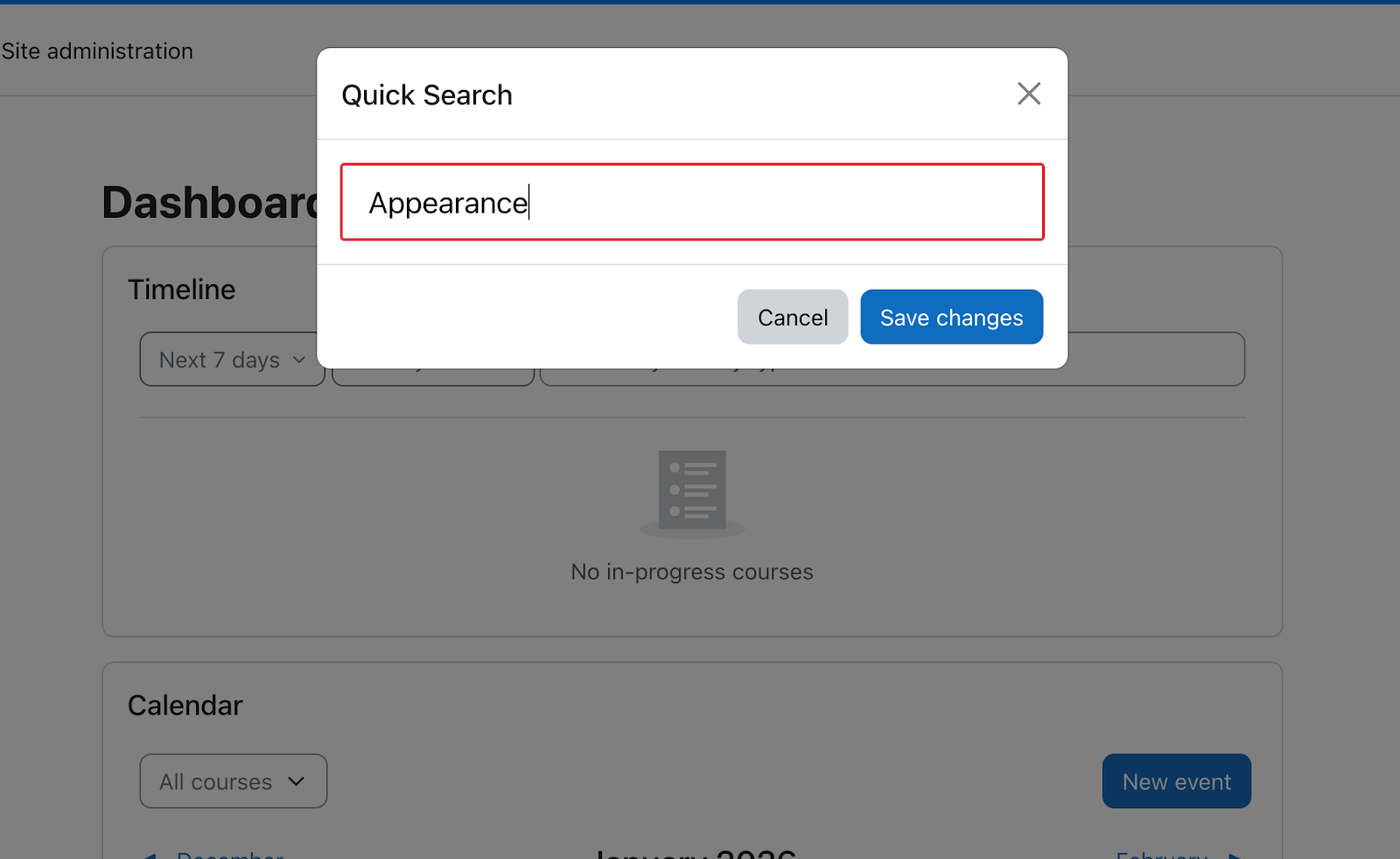
Search box with submit button

Winter 2023 Hack/Doc at Swarthmore

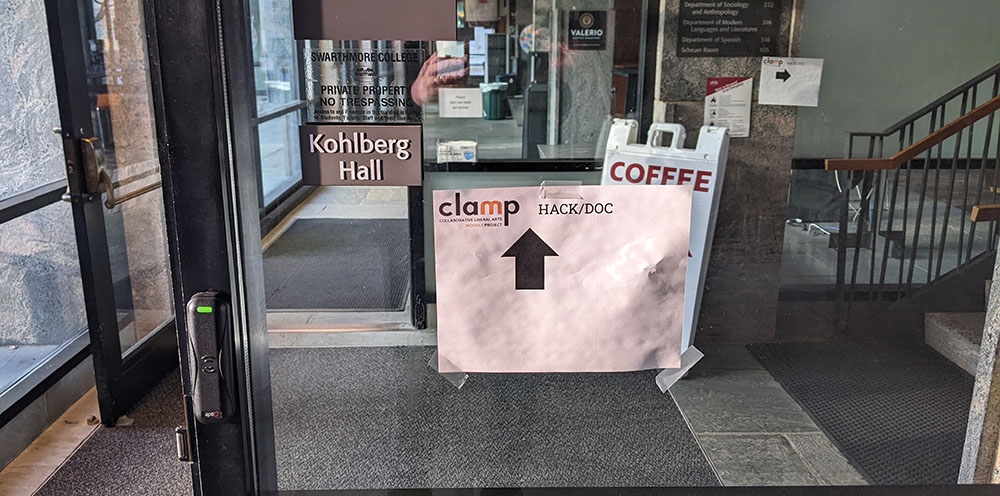
Paper sign taped to glass door
Kohlberg Hall, our home away from home for the next three days

CLAMP returned to Swarthmore College for three days of intensive evaluation of Moodle 4.0 and Moodle 4.1. Overall, the group’s impression of Moodle 4.0 and 4.1 was favorable, echoing the impression of the Summer 2022 Hack/Doc at Carleton College. We also did not discover any unpleasant surprises with the upgrade process. Read on below for details of the various issues we discussed.

Text editors

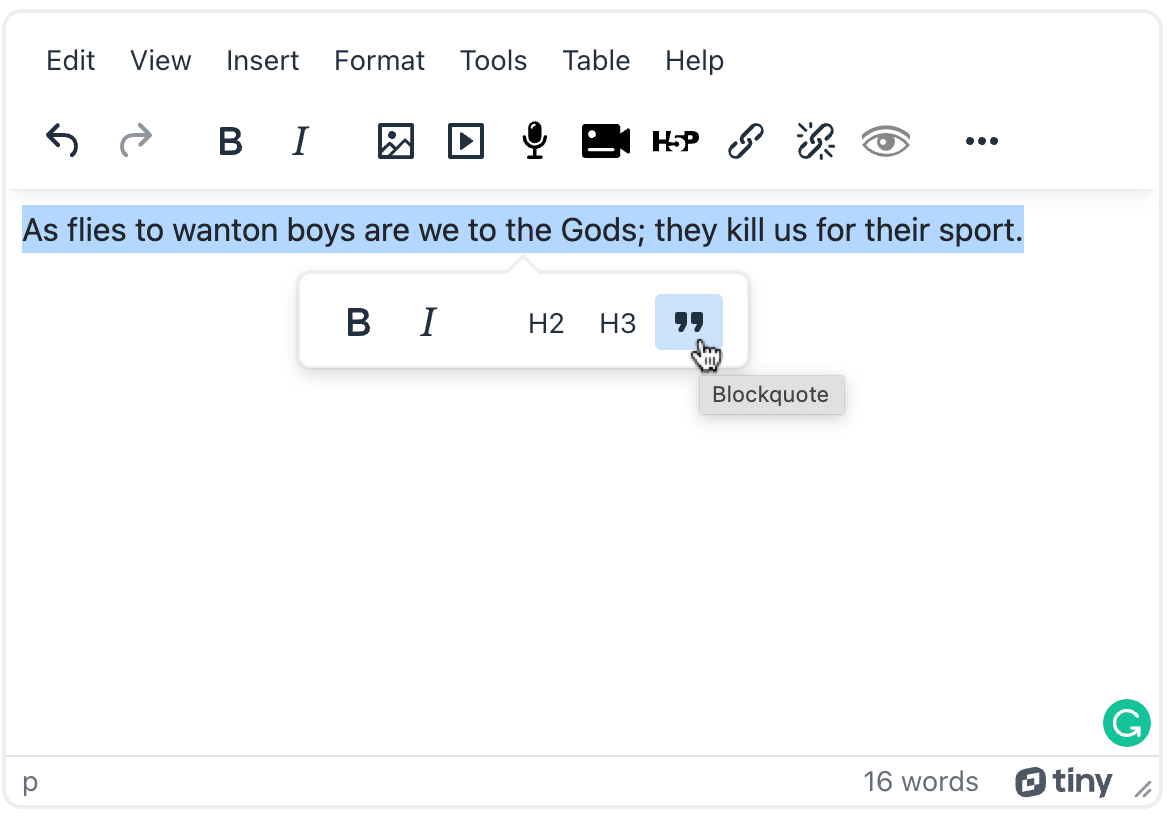
A quote from King Lear typed into a text editor
TinyMCE 6.x in Moodle; it’s possible to disable the icon. Note the word count and contextual formatting.

Atto, a rich text editor developed in-house by Moodle, has been the default since Moodle 2.7. TinyMCE has been available as an alternative. Moodle is now changing course, and TinyMCE 6.x is now available on Moodle 4.1, and will eventually replace Atto as the default text editor. There are now three text editors available on Moodle:

  • Atto HTML editor
  • TinyMCE 6.x (branded as TinyMCE HTML editor)
  • TinyMCE 3.x (branded as TinyMCE HTML editor (legacy))

Overall TinyMCE provides a more streamlined experience than other editors. One feature we liked was that you can select a block of text and then use a pop-up menu to apply formatting, similar to Tumblr and WordPress. There are a few things to note:

  1. You cannot apply font colors to text. This follows from Atto, which significantly limited the available colors on accessibility grounds. It does not sound like Moodle intends to change this behavior.
  2. Embedding links to documents and images aren’t properly supported yet; it will be in Moodle 4.2 (MDL-76520). CLAMP may backport this fix to Moodle 4.1 if there’s interest.
  3. The site administrator cannot configure toolbar buttons, as you can with Atto and TinyMCE legacy. Moodle recommends using capabilities instead. CLAMP is working on a list of these.
  4. When copying and pasting from Microsoft Word, TinyMCE properly cleans up all the custom CSS.

CLAMP does not recommend making TinyMCE the default until the link plugin is available, which should be in Moodle 4.2 or sooner.

Boost

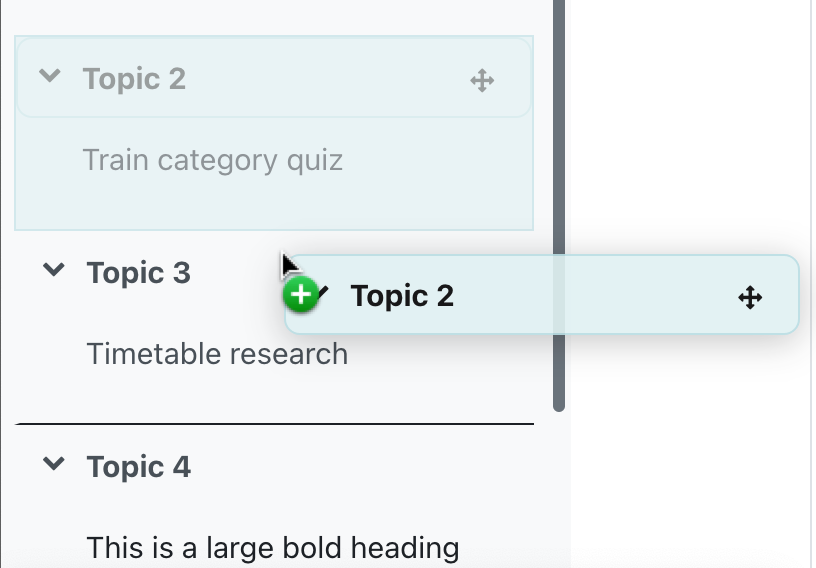
Menu showing topics that can be dragged and dropped to re-order them
Dragging a topic on the left-hand navigation menu to change the order.

We noticed a number of interesting changes to the default Boost theme:

  • Boxes can be removed by switching from default to plain in appearance
  • Menu items at the top can be customized in Boost admin settings
  • Sections can easily be rearranged in the Navigation menu, and this will renumber the Topics accordingly
  • The Navigation menu shows items within topic sections
  • The Block drawer is on the right and collapsed by default
  • A collapse/expand option is available at the top of the course, but not in the Navigation menu
  • The new move option (in the vertical three dots on right) is MUCH easier to use
  • You can easily show/hide the Navigation menu (left) and block menu (right)

Gradebook reports

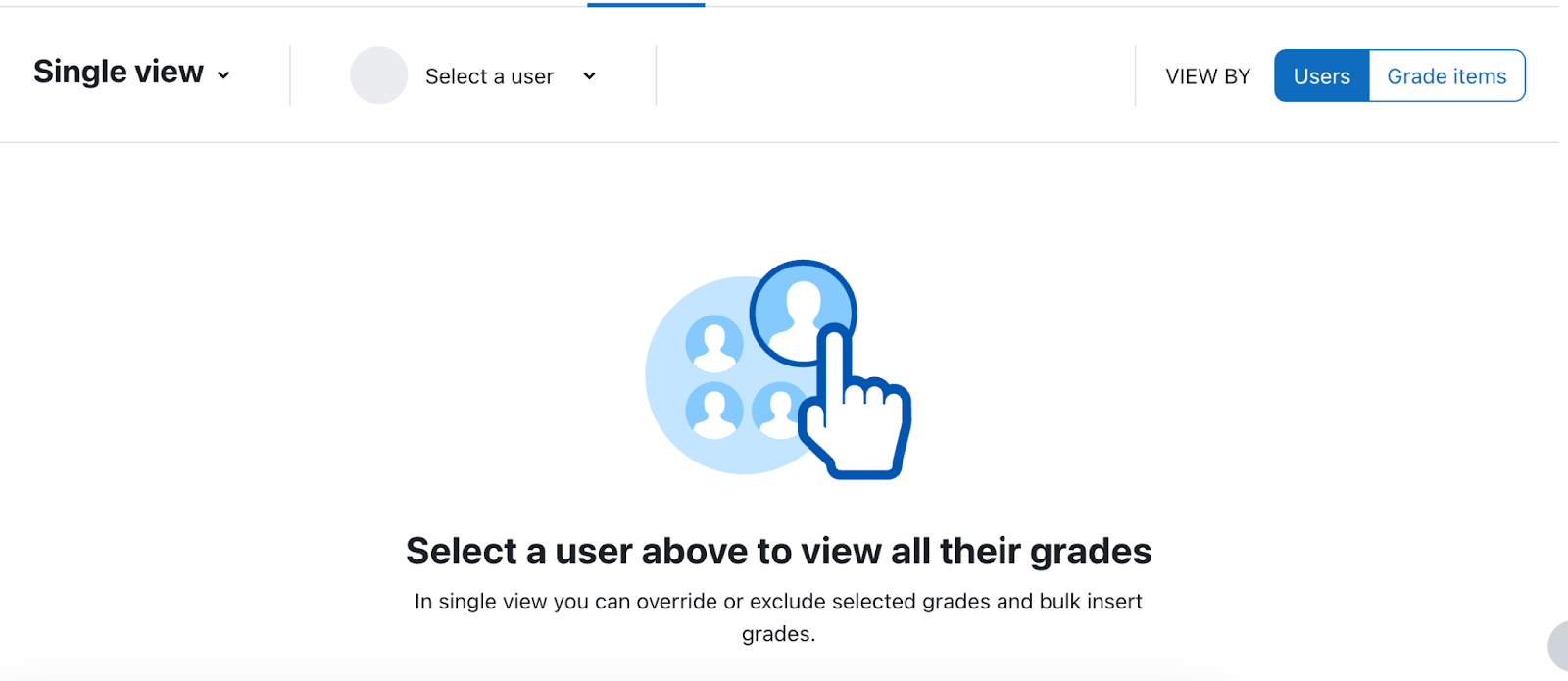
The grade book has a new Single View interface. The functionality is the same as Moodle 3 but the navigation and some of the behavior are different. Single View has more descriptive navigation but may take more clicks to get where you want.

You can select or search for users or grade items. You need to turn on editing (top right) to make changes to grades (this is a change from Moodle 3). Overall there are more steps than in Moodle 3 but possibly clearer for new users. You have to find the override/exclude options under the Actions menu instead of at the top of the table, which may be more mobile-friendly.

Upgrade testing

We did not experience any significant issues upgrading a Moodle 3.11 instance to Moodle 4.1. CLAMP has published a Google Sheet showing the various supported versions of PHP, MySQL, MariaDB, and PostgreSQL.

Swarthmore vs Swarthmore

CLAMP investigated whether to pronounce “Swarthmore” with or without the first “r” before turning to more profitable tasks, like extra credit calculation in the gradebook.

Reverse chronological order

There was some discussion around ordering topic sections in reverse chronological order. This is popular at Bucknell University. This is a manual setup: Instructors create topics in reverse order. For example (in a ten-week term), Topic 1 will be Week 10, Topic 2 = Week 9, etc. When the topics are created, instructors can set Restrict Access to a Date and time, which will then be automatically shown after said date/time. Asynchronous (and possibly synchronous) instructions will be needed. CLAMP also discussed the possibility of a small plugin that can do a one-time reverse-ordering of topic sections.

Database presets

The Database activity has new presets that may make it easier to use for journals and other uses such as diaries. Presets simply create the fields for you, but they can be updated and more can be added after the fact – no other settings are affected by the presets. Moodle comes with the following presets:

  • Image database preset – fields are title, image, description (alt text is a forced field, but you can’t make it required) (for those using Domains, this might be a decent substitute for an image-based splot)
  • Journal preset – entries are not private- all students see all other students’ entries. Date shows up at the bottom of the entry. This makes it less useful as an actual diary for personal use unless moderation is turned on and the instructor doesn’t approve anything.
  • Proposals preset – fields for title, summary, and content and then a field for whether or not it was approved (presumably for the instructor to update)
  • Resources preset – fields are title, author, cover (image), description, weblink, drop-down (type of resource – have to go in and edit the dropdown items manually) (useful for a group resource creation assignment).

Course reuse

We revisited the new Course reuse page, which we also discussed at Carleton. Import, Backup, Restore, Copy course, and Reset are all grouped under the “Course reuse” navigation item in the Course navigation. Navigating there brings up the Import page; the other pages are available from a drop-down at left. You may want to customize the “Course reuse” language string, which you can do by navigating to Site administration > Language > Language customization > English (United States) ‎(en_us)‎ > Open Language Pack > moodle.php  and then searching  “Only strings containing” with “reuse”.

Label, we hardly knew ye

Our old friend the Label resource has been renamed to “Text and Media area” (MDL-72531). It still behaves as it did before. One important note: when you have editing enabled, the label is listed in the left-hand Navigation menu, for easy manipulation. It’s listed using a truncated part of the text. If you duplicate it, the duplicated item appears in the navigation with the same text and (copy) appended. You will then need to modify the resource to update this. The students won’t ever encounter this issue.

Activity instructions

Moodle Assignment now has two separate text boxes for description and instructions. The (?) icon describes instructions this way:

The actions you would like the student to complete for this assignment. This is only shown on the submission page where a student edits and submits their assignment.

  • Descriptions can be displayed on the course page or within the module
  • Instructions are only displayed once a student “Adds a submission” or “Begins assignment” (timed)
  • Instructions can be used if you want to hide a prompt until a students starts an assignment
    Or give nitty gritty details: upload in a PDF format, title you file X, etc.

Event monitoring

Sharon Strauss from Haverford presented on Moodle’s event monitoring feature. This is not a new feature in Moodle 4.1 but many of the attendees were unfamiliar with it. Moodle defines numerous events that can be triggered, such as for new forum posts, or assignment submissions. With the event monitoring feature, you can allow teachers and administrators to subscribe to given events and receive email notifications. This is separate from any other built-in notifications.

Tour of Swarthmore’s facilities

Michael Jones, the Director Of Language And Media Centers\Makerspace at Swarthmore, kindly took the Hack/Doc attendees on a tour of Swarthmore’s instructional spaces. We visited a classroom equipped for active learning, a podcasting studio, a studio equipped for recording remote lectures, and a maker space.

What’s next

CLAMP will release a beta of Moodle 4.1 with the Liberal Arts Edition towards the end of January. The regular LAE releases will come out the week of January 16th. The next Moodle Hack/Doc Fest, focusing on Moodle 4.2, is tentatively scheduled for mid-June 2023, location to be determined.

Hack/Doc at Carleton: Day 3

Kristi contemplates infinity
Em flexes for the final plunge
Charles plummets for the sidewalk

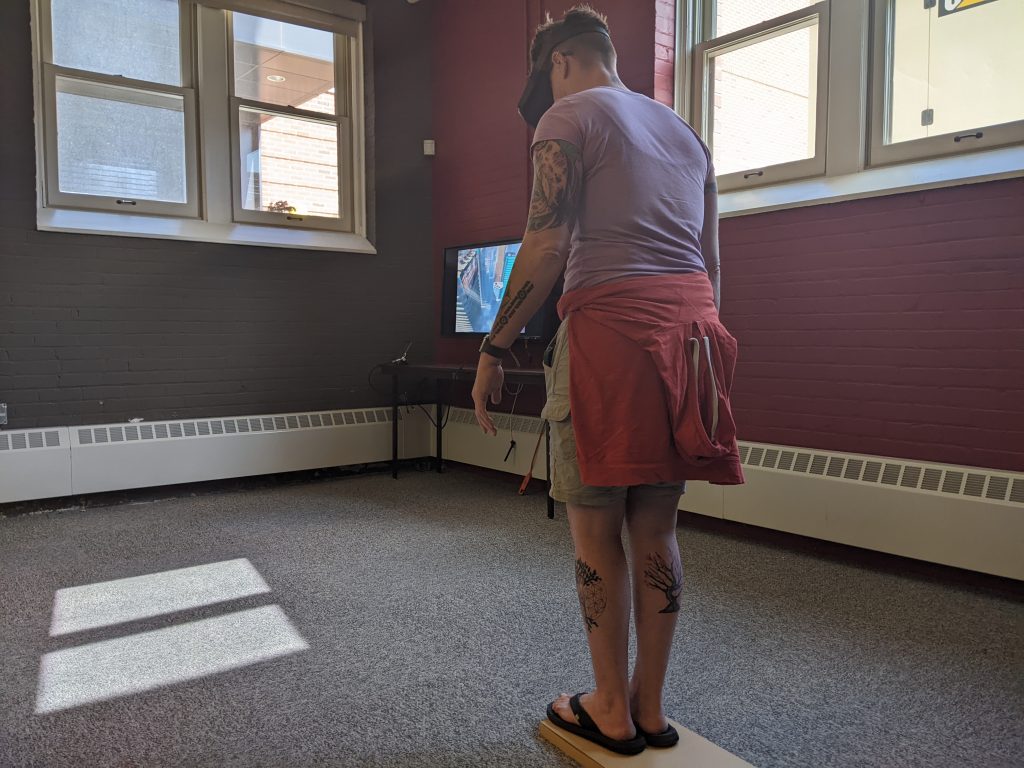
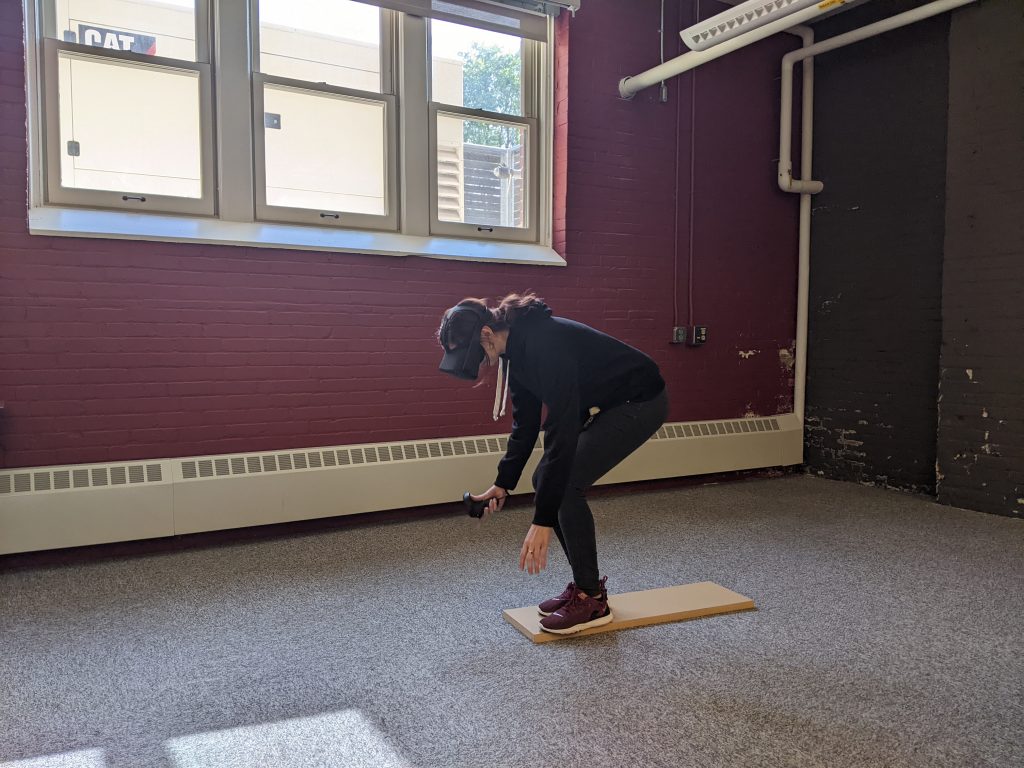
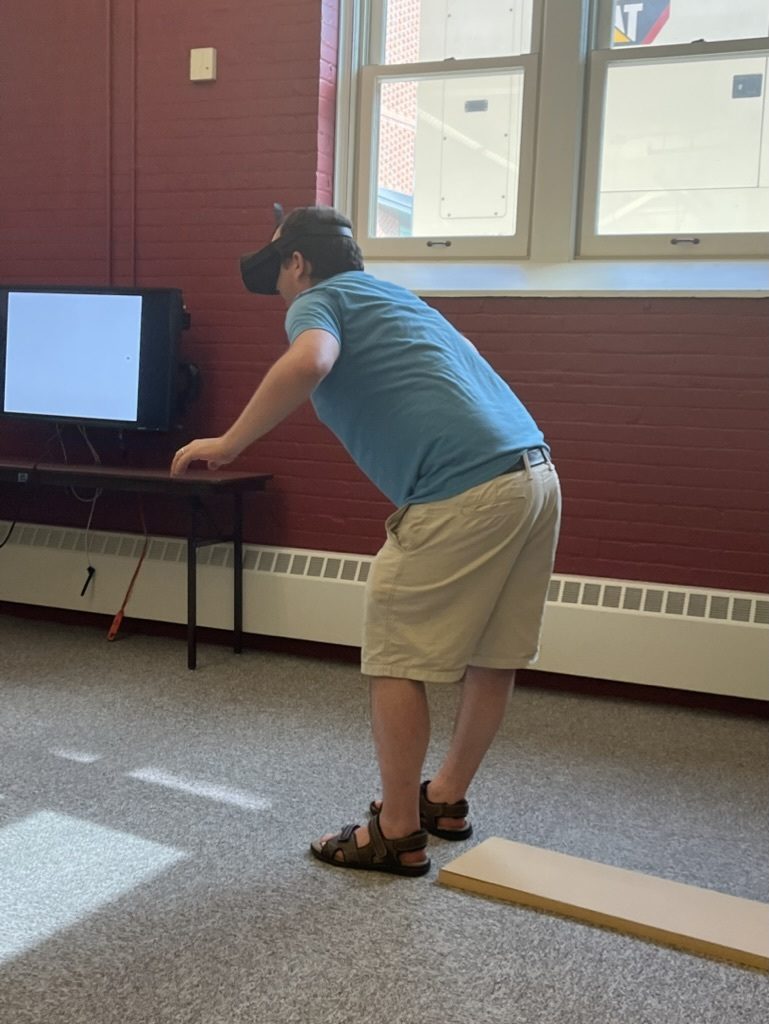
Late Wednesday afternoon the Hack/Doc attendees were invited to the basement of Weitz to walk the plank. Not off the edge of a pirate ship, but through virtual reality, via a headset and Richie’s Plank Experience. In this experience, a wooden plank is placed on the floor and then mapped to a virtual location. Wearing the VR headset, each person “rides” an elevator to the top of a “building”, and the door opens, revealing the plank, swirling air, and long drop below. The goal is to overcome your sensory input and walk off the edge of the plank to plummet several hundred feet to the ground. The other people in the room see what you’re seeing but don’t get the same immersive experience.

It’s incredibly difficult. Almost everyone successfully “walked the plank” and plummeted in the end, but several needed multiple tries to do it. The objective knowledge that you’re standing in a basement, surrounded by friends and colleagues, is nothing against the sensory input that you’re hundreds of feet up and inches from disaster. The below video shows Kristi Burch during her second (successful) fall:

Grading with letters

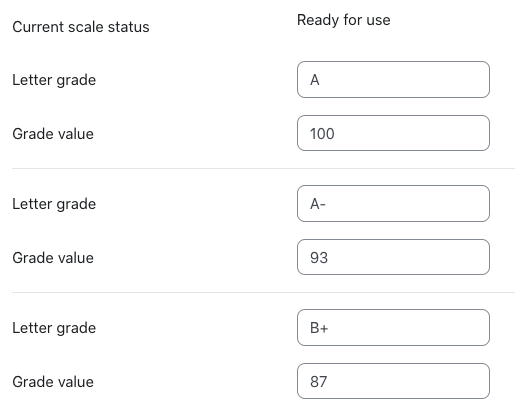
A non-functional prototype of how a teacher would define the letter scale.

During Carly Born’s Moodle Showcase presentation on the grade book (see the Day 2 recap), several participants discussed the long-standing desire to grade with letters. Thursday, Hack/Doc attendees discussed what such a module might look like and prototyped the interface. Ideas:

  • This could probably be delivered with an advanced grading form, similar to rubrics or checklist
  • Teachers should be able to create direct mappings between letters and grade values
  • Students should see the letter and not the grade value

CLAMP will schedule a follow-up online event in July or August to determine the next steps.

Anonymous forums

Testing of the LAE 4.0 beta revealed one minor problem with the anonymous forums patch: the Moodle logs, restricted to teachers and administrators, show the actual poster of anonymous forum posts and not the Anonymous User. This is unexpected and probably true in previous versions of Moodle. CLAMP intends to correct this problem in the next stable releases, scheduled for mid-July 2022. Note that even with this patch, a teacher can always look at the course logs and see who was active on the forum at any given time, and the patch does not mask IP addresses.

Wrap-up

And that’s a wrap on the Moodle Hack/Doc Fest for Summer 2022 at Carleton College.  A big thank you goes out to our participants, both in-person and online, to those who attended the Moodle Showcase talks, and to Carleton College for being such an excellent host. CLAMP will announce its plans for the Winter 2023 Hack/Doc Fest after the start of term this fall.


Summer 2022 Hack/Doc Fest: Event page | Day 1 | Day 2 | Day 3


Moodle 2.8 and 2.9 gradebook advisory follow-up

In late May CLAMP became aware of several critical bugs in the Moodle gradebook which were introduced in 2.8. After assessing, CLAMP issued an advisory recommending against upgrading to Moodle 2.8 or 2.9 until those bugs were mitigated. Since then Moodle core and members of the Moodle community have made considerable progress working on these issues, and CLAMP believes it is now safe to upgrade to 2.8 and 2.9. Please continue reading for a full explanation. Read more